

6 Ways To Find YouTube Trends Fast
Want to grow your YouTube channel quickly? Staying ahead of trends is key. With over 500 hours of content uploaded to YouTube every minute, it’s crucial to create videos people are searching for right now. This guide covers six methods to help you spot trends early and boost views:
- Outlier: Analyze top-performing videos in your niche for $9/month.
- YouTube's Trending Tab: Check real-time updates on popular videos.
- Google Trends: Identify breakout YouTube search terms by switching to "YouTube Search."
- VidIQ: Track competitors and find high-demand keywords with low competition.
- Hootsuite: Monitor hashtags and conversations across social platforms to spot trends early.
- TubeBuddy: Use its keyword tools to find untapped topics with high search potential.
Pro Tip: Timing matters - publish trend-based content within 24–48 hours for the best results. Use these tools together to identify, research, and create videos that align with what viewers want now.
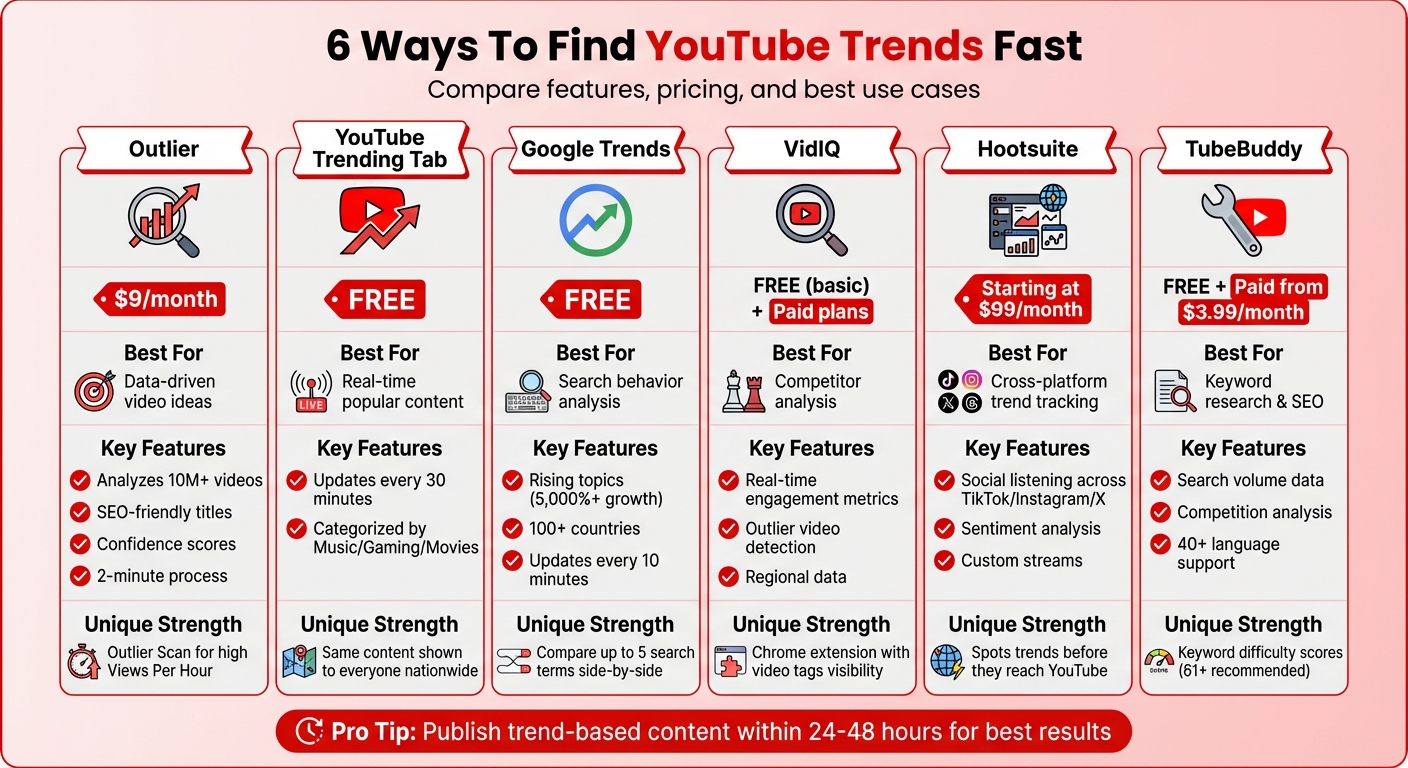
6 YouTube Trend Research Tools Comparison Chart
How To Find (HOT) Trending Topics On YouTube 2025
1. Use Outlier for Data-Driven Video Ideas
Outlier is a tool designed to quickly generate personalized video ideas by analyzing top-performing content in your niche. It focuses on identifying videos that perform significantly better than the average on similar channels, giving you insights into topics that are currently resonating with audiences.
The platform doesn’t just stop at identifying trends. It dives into competitor channels and provides SEO-friendly titles, engaging hooks, and confidence scores (ranging from low to very high potential), helping you prioritize which ideas to pursue. Best of all, this entire process takes just about 2 minutes.
To date, Outlier has processed over 10 million videos and analyzed more than 100,000 channels, uncovering over 1 million outlier videos. This extensive database allows the tool to pinpoint opportunities where high-demand keywords meet low competition - making it possible for smaller channels to rank and grow.
"OutlierKit is the first tool that actually improved our view counts almost instantly. The competition analysis revealed gaps we never knew existed." - Gautham, YouTube Strategist
One standout feature is the Outlier Scan, which highlights videos with high Views Per Hour. This data can guide you in crafting attention-grabbing titles and thumbnails that mimic successful trends. At just $9 per month, Outlier is built for creators seeking straightforward, actionable strategies without the overwhelming complexity of enterprise-level analytics tools. For additional insights, you can also explore options like YouTube's Trending tab to spot emerging topics.
2. Check YouTube's Trending Tab
YouTube's Trending tab is your go-to for spotting videos that are grabbing attention across the U.S. You can find it under the "Explore" section or through your homepage navigation. Unlike your personalized feed, this tab shows the same content to everyone, making it a solid way to gauge what’s currently popular nationwide.
The list refreshes every 30 minutes, giving you almost real-time updates on what’s trending. Videos are ranked based on several factors like total views, how quickly they’re gaining traction (referred to as "temperature"), traffic sources, and how recently they were uploaded. This means a newer video with rapidly increasing views can outrank an older one with more total views.
To make it even more useful, YouTube organizes trending content into categories like Music, Gaming, and Movies. This segmentation helps you focus on trends that align with your channel's niche. Plus, in YouTube Studio, the "Trends" tab highlights features like "Breakout videos", top searches, and content gaps - areas where there’s high demand but little content available.
"Trending topics act like magnets, attracting a wider audience curious about the latest buzz." - Kristi Kates, Fourthwall
If you notice a trend that aligns with your channel, timing is everything. Publishing your take on the trend within 24–48 hours maximizes your chances of catching the wave of interest. Just make sure to put your own spin on it - don’t simply mimic what’s already out there.
3. Use Google Trends for Search Data
Google Trends is a free and powerful tool for understanding YouTube search behavior. To get started, switch the default setting from "Web Search" to "YouTube Search". This adjustment filters out general web activity and focuses solely on what people are actively searching for on YouTube itself. One standout feature is the "Rising" section, which showcases breakout topics - search terms experiencing explosive growth, sometimes with increases over 5,000% in search volume.
Here’s an example: A channel noticed a rising query about "Armenia" and quickly created a video on the topic. The result? They doubled their average views. You can also adjust the timeframe - ranging from the past 4 hours to several years - to distinguish between fleeting viral moments and recurring seasonal trends. For instance, the "Interest over time" graph can reveal patterns like "pumpkin spice latte" searches spiking every fall or "tax tips" gaining traction in March and April. Leveraging these insights can help you time your uploads to align with peak interest periods.
Another great feature is the "Trending Now" page, which updates every 10 minutes on average. This gives you nearly real-time insights into trending topics across more than 100 countries. You can even compare up to five search terms side-by-side to see which one is gaining the most momentum. For additional inspiration, scroll down to the "Related queries" panel. This section highlights related keywords that could inspire a new video series or help refine your tags and descriptions.
If you're aiming to capture sudden trends, set the timeframe to "Past 24 hours" and check out the "Real-time search trends". This feature is ideal for spotting and reacting to immediate spikes in interest, giving you the chance to create timely content that resonates with current viewer demand.
sbb-itb-08cadfc
4. Analyze Competitors with VidIQ
VidIQ is a powerful tool for keeping tabs on what’s working for other creators in your niche. By analyzing competitors, you can uncover strategies that are resonating with audiences right now. For example, its keyword research feature helps identify popular search terms, showing both search volume and competition levels. This gives you insight into what viewers are actively searching for and where opportunities might lie.
Another standout feature is VidIQ's ability to detect "outlier" videos - those that outperform a channel’s usual content. This can help you spot potential viral trends early on and adjust your strategy accordingly.
VidIQ also offers a free Chrome extension that reveals real-time engagement metrics and video tags for any YouTube video. One creator used this feature to grow their channel by over 54,000 views in just 90 days. This makes it easy to explore competitor channels, identify high-performing keywords, and determine what’s driving their success. With this real-time data, you can pinpoint niche opportunities and craft content that stands out.
Pay attention to the "rising keywords" section, which highlights terms gaining popularity before they become overly competitive. VidIQ even provides regional data, showing where specific keywords are trending, so you can fine-tune your content for different audiences.
The platform also helps you identify content gaps - topics with high search demand but little high-quality coverage. By entering keywords into the research tool, you can find phrases with high search volume and low competition, giving you a chance to create content that fills those gaps. Additionally, reviewing engagement metrics such as likes, comments, and shares can reveal which topics are striking a chord with viewers.
VidIQ offers a free version through its Chrome extension for basic analysis. For those looking for more advanced features like trend alerts and in-depth engagement analytics, paid subscription plans are available.
5. Track Social Media with Hootsuite
Keeping up with social media trends is essential for crafting a solid trend strategy, and Hootsuite makes it easier to stay ahead of the curve. Trends on YouTube often originate on other platforms like TikTok, Instagram, Pinterest, or X (formerly Twitter). With Hootsuite, you can monitor trending topics and hashtags across these platforms, giving you a broader perspective and helping you spot trends before they make their way to YouTube.
Hootsuite’s social listening tools are a game-changer. They track conversations, keywords, and hashtags across multiple platforms, offering insights that 62% of social marketers rely on to shape their strategies. Additionally, 31% of marketers use it to analyze broader cultural shifts. This tool helps you uncover "micro-virality" - those niche trends that might not be mainstream but resonate deeply with specific audiences, often yielding more meaningful engagement.
Hootsuite emphasizes the importance of this approach in its report:
"Social listening refines the art of trendjacking... Real-time data from social listening helps brands understand if a trend is resonating with their audience, what they're saying, and how they feel about it." - Hootsuite Social Media Trends 2025 Report
Another standout feature is Hootsuite’s sentiment analysis. It doesn’t just measure how often a topic is mentioned - it digs into the emotions and attitudes behind those mentions. This allows you to gauge whether your audience feels positively or negatively about a trend. You can also set up custom streams to track niche-specific keywords, like #makeup for beauty creators, and receive alerts when interest spikes. This ensures you’re ready to act on trends as they emerge.
Beyond trend tracking, Hootsuite provides valuable insights for strategic content publishing. It can identify the best times to post based on when your audience is most active. Starting at $99 per month, Hootsuite’s cross-platform analytics also help you pinpoint content gaps - such as topics gaining traction on TikTok or X that haven’t yet been explored on YouTube.
6. Research Keywords with TubeBuddy
When it comes to crafting a data-driven strategy for YouTube, keyword research is a cornerstone. That’s where TubeBuddy, a browser extension designed for YouTube SEO and channel management, shines. Its Search Explorer feature provides insights into monthly search volumes, total video views, and keyword ranking difficulty - helping you gauge how competitive a search term is.
TubeBuddy breaks down the numbers, showing search volumes and total views for specific keywords while also highlighting competition levels. This makes it easier to find trending topics that haven’t yet become oversaturated. The goal? Pinpoint keywords with high search volume but low competition - the sweet spot for growth. For reference, a keyword score of 61 is considered a solid choice, balancing search demand with manageable competition.
The tool doesn’t stop there. It suggests long-tail keyword variations and tags, uncovering even more opportunities for trending topics. TubeBuddy also audits your channel, flagging missing keywords or metadata gaps that could be holding back your video’s visibility.
TubeBuddy’s pricing starts with a free plan, while paid plans begin at $3.99 per month (billed annually). One standout feature is its automatic translation, which supports over 40 languages, giving you access to global trends. Unlike YouTube Studio analytics, TubeBuddy goes a step further by showing keyword difficulty and competitive search data before you even create a video. This allows you to make informed, data-backed decisions that align with your channel’s growth strategy.
Conclusion
Leverage these tools to turn trending data into actionable video content. Platforms like YouTube's Trending Tab and Google Trends offer a snapshot of what's currently popular, while VidIQ and TubeBuddy provide SEO insights to help your videos stand out. Hootsuite monitors conversations across multiple platforms, and Outlier helps translate all that data into personalized video ideas tailored to your audience.
To get the most out of this strategy, combine these tools to identify high-demand topics with manageable competition and quickly address content gaps. Begin with Google Trends and YouTube's Trending Tab to spot popular topics. Next, use VidIQ or TubeBuddy to evaluate keyword performance - look for keywords with high search volume but low competition. Additionally, analyze your competitors’ engagement to uncover opportunities they may have missed. As Ayush Sood, a freelance writer and marketer, explains:
"Learning to identify trending topics isn't just algorithm-chasing - it's understanding what your audience is genuinely curious about right now."
That said, not every trend will fit your channel. With over 500 hours of content uploaded to YouTube every minute, standing out requires a focus on trends that align with your niche and audience. Chasing every viral topic can dilute your brand, so stick to what resonates with your viewers.
These tools cater to different budgets, from free options to paid plans starting at $9/month, allowing you to pick the ones that match your needs.
Timely execution is crucial, but consistency matters even more. Posting on a regular schedule builds trust with your audience better than sporadic uploads, no matter how frequent they are. Find a rhythm that lets you capitalize on trends while avoiding burnout.
Act swiftly on trends that fit your channel, streamline your workflow, and use data to fuel your growth.
FAQs
How do I use Google Trends to discover trending topics on YouTube?
To discover trending topics on YouTube using Google Trends, start by visiting Google Trends and entering a keyword tied to your niche. Make sure to switch the search type to YouTube Search for more relevant insights. Analyze the data provided, such as interest over time, regional popularity, and related topics. Be sure to focus on rising searches, as these often point to new and growing trends that could spark ideas for your next video.
How can I effectively track my competitors' performance on YouTube?
To gain an edge over your competition, begin by checking out YouTube's Trending section to spot videos that are resonating within your niche. Use tools designed to analyze competitor content and track trends to see what’s currently working. Don’t forget to dive into YouTube Studio’s Research tab - it’s a goldmine for discovering trending search queries and getting a clearer picture of what your audience is actively seeking. These strategies can help you pinpoint opportunities and fine-tune your approach.
Why does timing matter for creating trend-based YouTube content?
Timing plays a key role when creating trend-based content for YouTube because trends don’t stick around forever. Uploading your video while the topic is still hot ensures it reaches viewers at the height of their interest. This approach not only improves visibility but also boosts engagement since YouTube’s algorithm favors fresh, timely content.
On top of that, posting when your audience is most active can give your video an extra push. Aligning your upload schedule with their viewing habits increases the chances of your content being seen, shared, and interacted with.


