

Predictive Content Modeling For YouTube Creators
Predictive content modeling uses data to predict which YouTube topics, formats, and strategies will perform well. Instead of guessing, creators can analyze trends, identify high-demand content gaps, and optimize their videos for better results. The goal? Make informed decisions before creating, boosting performance metrics like click-through rates (CTR) and watch time.
Key Takeaways:
- 95% of videos get fewer than 1,000 views, but data-driven strategies can increase success by up to 10x.
- Focus on metrics like CTR (4–6% is strong, 10%+ signals viral potential) and audience retention (70%+ in the first 15 seconds).
- Use tools for trend analysis, competitor research, and spotting content gaps.
- Build a structured workflow: Research → Analyze → Create → Optimize → Repeat.
By studying high-performing videos, analyzing audience behavior, and planning seasonal or trending content, you can grow your channel with precision.
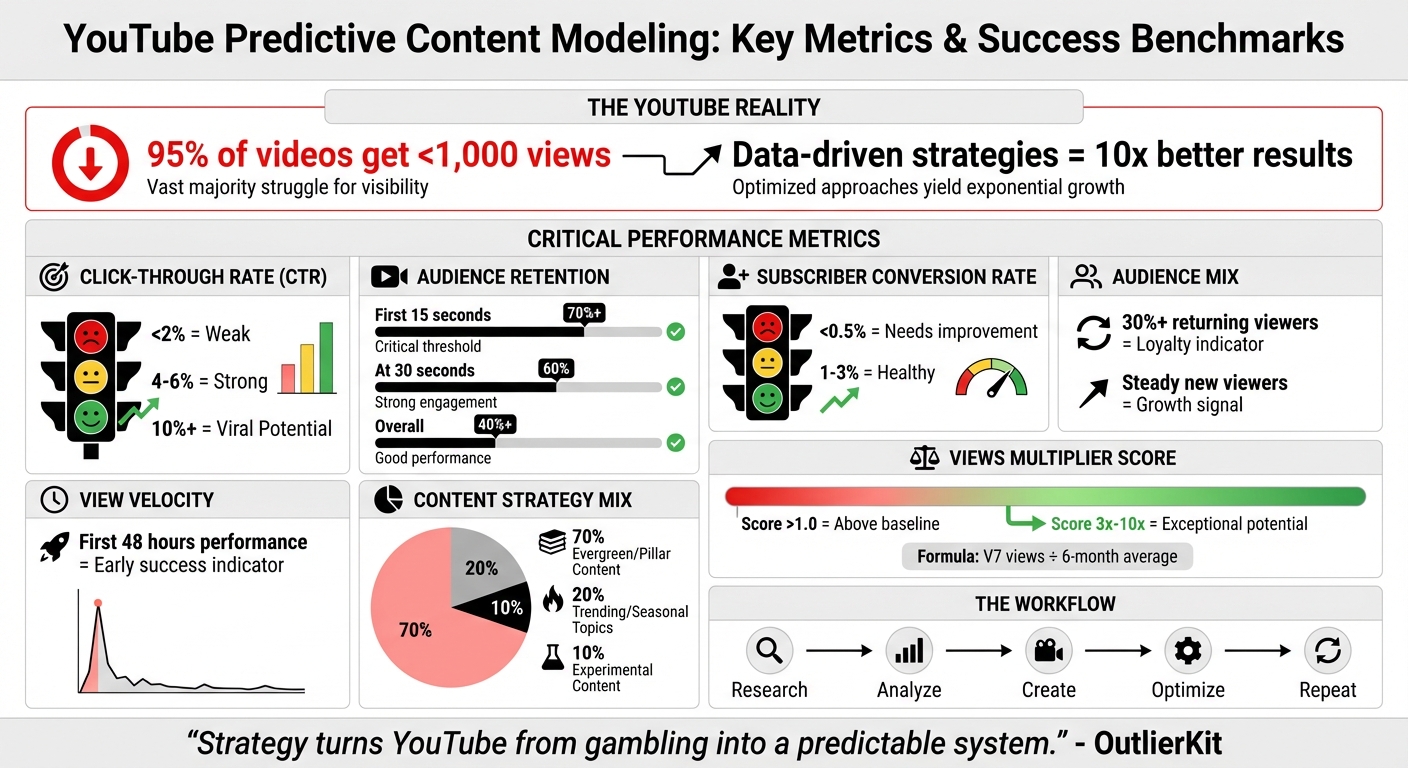
YouTube Predictive Content Modeling: Key Metrics and Benchmarks for Creators
Key Metrics That Drive Predictive Content Modeling
To create accurate content forecasts, it’s essential to track the metrics that form the foundation of predictive modeling. These key performance indicators provide a clear picture of your content's effectiveness and guide your strategy moving forward.
Core Metrics to Monitor
Predictive modeling relies heavily on understanding how your content performs across a few critical areas. One of the most important metrics is the click-through rate (CTR), which measures how well your thumbnail and title work together to attract clicks. A CTR below 2% is considered weak, while 4–6% is a strong baseline. Achieving a CTR of 10% or higher signals that your content has the potential to go viral.
Another important factor is average view duration (AVD) and total watch time, which are key indicators for YouTube’s algorithm. Higher watch times suggest your content is engaging and valuable, increasing the chances of being recommended to more viewers. Audience retention adds another layer of insight, showing you exactly where viewers lose interest or rewatch specific segments through second-by-second engagement data.
View velocity, which tracks the number of views in the first 48 hours, is another early signal of whether a video will gain traction. Alongside this, keeping an eye on your subscriber conversion rate is critical. A healthy rate falls between 1–3%, while anything below 0.5% may indicate that your content isn’t resonating with the right audience.
"Data tells you what happened. Analytics tells you why it happened. Strategy tells you what to do next." – ViewsGrowth
These metrics don’t just reflect raw numbers - they reveal how your audience interacts with your content.
Understanding Audience Behavior Through Analytics
A balanced mix of returning and new viewers is vital for sustainable growth. Ideally, at least 30% of your audience should consist of returning viewers, as this reflects loyalty. At the same time, a steady influx of new viewers signals that your reach is expanding. YouTube Analytics offers deeper insights by categorizing viewers as "casual" (watched within the last 1–5 months) or "regular" (watched in the past 6+ months), helping you identify patterns of viewer loyalty.
Retention graphs are a goldmine for understanding engagement. A flat retention curve means viewers stayed engaged throughout the video, while spikes highlight moments that were particularly impactful or rewatched. On the flip side, dips in the curve show where viewers lost interest, offering clues about areas that may need improvement. If retention drops below 70% within the first 15 seconds, it’s a clear sign that your opening hook needs refinement.
Establishing Performance Benchmarks
Once you’ve analyzed audience behavior, the next step is to set performance benchmarks for your channel. YouTube Studio’s "Typical Performance" feature is a helpful tool, allowing you to compare each new video against your last 10 uploads of similar length. This provides a personalized benchmark to measure success. For a more comprehensive view, analyze data over a 90-day period to establish median values for views, CTR, and average view duration.
Organizing your content into categories - such as formats, series, or styles - can also help you identify trends. Look for videos that consistently outperform your median benchmarks, as these point to topics or formats with high potential. With these baselines in place, you’ll have the foundation needed to build predictive models that guide your future content strategy.
Practical Predictive Modeling Techniques For YouTube Creators
Use predictive modeling to turn your channel's performance data into actionable insights. These methods help you move from analyzing past results to making smarter, forward-thinking decisions.
Scoring Video Ideas Based on Past Performance
A great way to evaluate video ideas is by calculating the Views Multiplier Score (or Outlier Index). Here’s how it works: take the views a video received in its first seven days (V7 views) and divide that by your channel's average viewership over the last six months. A score above 1.0 means the video outperformed your baseline, while scores between 3x and 10x highlight topics with exceptional potential.
Start by determining your channel’s six-month average views - this will serve as your benchmark. Then, look at your past videos to see which topics, formats, or styles consistently scored above 1.0. If you find a style or topic hitting the 3x mark, that’s a clear sign to double down on similar content.
But don’t just rely on views alone. Use predictive metric benchmarks to gauge a video’s potential even before publishing. Videos with a click-through rate (CTR) of 4–8% or higher, combined with at least 40% overall audience retention (and 60% retention in the first 30 seconds), tend to perform well. When analyzing your outliers, reverse-engineer their success. For example, pinpoint “pattern interrupts” every 15–20 seconds - these are moments that keep viewers hooked - and replicate them in future scripts.
Another powerful tool is the Transfer Method. This involves studying successful content from related niches to test demand. For example, if you create baseball-related videos, look at how basketball channels use "controversy" formats. If it works for them, it might work for your audience too, allowing you to test the concept with minimal upfront effort.
Identifying Early Signs of Trending Topics
While historical data is valuable, spotting trends early can give you a major edge. One reliable indicator is view velocity, or how quickly a video gains traction. If a video gets 3x–5x more views than your channel average within the first 24 hours, it’s a strong sign of algorithmic promotion and audience interest.
Retention is another key factor. Videos with 60% retention at the 30-second mark show strong engagement, which is worth replicating. Additionally, watch for spikes in retention graphs - these are moments where viewers rewatch or share specific parts of your video. These segments often contain ideas that can be expanded into full-length content.
You can also capitalize on content gaps - areas where there’s high viewer demand but few quality videos available. Use the "Research" tab in YouTube Studio to identify these gaps. Then, validate the demand with keyword research to find “low-competition, high-demand” topics where smaller creators are already succeeding.
Planning for Seasonal Trends and Time-Based Patterns
Seasonal events - like holidays, back-to-school periods, or major cultural moments - bring predictable spikes in viewer interest. To stay ahead, create a 90-day rolling calendar. This approach lets you plan for the next 12 weeks while continuously updating your schedule as each month ends.
Structure your content strategy using a 70/20/10 mix:
- 70% for evergreen content that meets your audience’s core needs.
- 20% for trending or seasonal topics.
- 10% for experimenting with new formats.
For example, a cooking channel might focus on evergreen recipe tutorials, but seasonal topics like "Thanksgiving Side Dishes" or "Valentine’s Day Desserts" can capture timely search interest.
Before committing to a seasonal idea, validate its demand using Google Trends filtered for "YouTube Search." Also, review your channel’s historical data for recurring spikes - like fitness content in January or tech reviews in December. Plan and prepare this content well in advance. To avoid burnout during peak times, batch-produce videos during slower periods.
Finding Emerging Topics Using Channel And Competitor Data
Your channel's performance data and competitor insights can uncover new content opportunities. Instead of relying on guesswork, you can use patterns that already resonate with audiences similar to yours.
Finding New Ideas in Your Channel Data
Start by reviewing your uploads from the past 3–6 months. Calculate an average performance baseline using your last 10–20 videos, then identify any video that performs 3x to 10x above this average as an outlier. These outliers highlight what’s already connecting with your audience.
Pay attention to how quickly a video gains views in the first 48 hours - this "view velocity" can signal strong algorithmic promotion. Similarly, high subscriber conversion rates indicate topics that align well with your audience's interests.
For example, in October 2025, a DevOps creator with 8,000 subscribers noticed a video on "Kubernetes troubleshooting" that hit 23,000 views - a staggering 19x over their baseline. By creating a series based on this format, the channel grew to 24,000 subscribers in just six months.
You can also use the YouTube Studio Research tab to uncover search terms driving traffic to your channel. This feature can help you identify content gaps. Don’t overlook your comment section either - viewer questions and requests often point to sub-topics you haven’t fully explored.
Analyzing Competitor Channels for Trends
Once you’ve mined your own data, competitor analysis can provide a broader view of emerging trends. Focus on channels with similar subscriber counts - ideally within a 10x range of your own. These channels offer more practical insights than larger ones, as their strategies are easier to replicate.
Use YouTube’s sorting options to your advantage. The "Most Popular" filter highlights evergreen topics, while "Newest" helps you spot trends that are just starting to gain traction. Look for competitor videos that significantly outperform their average views. These outliers often reveal topics or hooks that strike a chord with audiences.
Pay attention to metrics like views per hour (VPH) to identify trending content. For instance, a small business marketing channel with 2,500 subscribers noticed that competitor videos with specific dollar amounts in their hooks - like "How I Cut $4,127 from Marketing" - consistently performed well. After adopting similar hooks, their average views jumped from 400 to 2,400 per video.
To ensure you’re staying current, focus on competitor videos uploaded in the last 3–6 months. This keeps your insights aligned with the latest algorithm preferences and audience interests.
Using Outlier for Data-Driven Insights
Incorporating tools like Outlier into your workflow can make competitor research faster and more precise. Outlier analyzes the last 90 days of competitor content and provides actionable video ideas in just two minutes. Simply enter a competitor’s channel URL, and the tool suggests titles, hooks, and confidence scores based on proven patterns and view velocity data.
Outlier tracks metrics such as the competition ratio - a comparison of search demand to the quality of existing content. A ratio above 4.0x signals a strong opportunity to rank well. The platform also identifies month-over-month growth trends, helping you spot topics before they become oversaturated.
"OutlierKit is the first tool that actually improved our view counts almost instantly. The competition analysis revealed gaps we never knew existed." - Gautham, YouTube Strategist
The tool goes beyond surface-level data by including psychographic insights, such as ideal video length (e.g., 8–12 minutes versus longer deep dives) and tone preferences (e.g., non-hyped versus energetic). This helps you tailor not just what you create, but how you present it to your audience. Best of all, Outlier doesn’t require a subscription or a direct connection to your YouTube account, making it accessible for creators at any stage who want data-driven content strategies.
sbb-itb-08cadfc
Building Predictive Content Modeling Into Your Workflow
To make the most of your predictive analysis and trend validation, weave these insights directly into your content creation process. The goal? Move from gut-driven decisions to a structured workflow: Research → Analyze → Create → Optimize → Repeat.
Creating a Predictive Content Calendar
A predictive content calendar combines data-driven decisions with the flexibility to adjust for platform shifts. A rolling 90-day calendar is ideal for staying ahead of trends while remaining adaptable.
Organize your calendar using the 70/20/10 content mix:
- 70% pillar or evergreen content that addresses your audience’s core needs.
- 20% complementary content that dives into related topics.
- 10% trend-driven or experimental content.
Channels that stick to a documented strategy like this grow subscribers 3.2x faster than those without one.
Timing is everything. Use YouTube Analytics to pinpoint when your audience is most active, and schedule uploads during these peak times. Work backward from these windows to set filming and editing deadlines, leaving buffer days for unexpected trends or delays.
Batch production can help you stay ahead. For instance, dedicate one day to filming multiple videos - maybe four in a single session. This approach ensures you're always ready to respond quickly to new opportunities.
Ranking Ideas With a Scoring System
Not all ideas are created equal. A scoring system helps you prioritize concepts based on their potential to succeed. One effective method is the Views Multiplier Score: divide the projected views of an idea (based on competitor performance) by your channel’s average views. A score above 1.0 indicates a strong opportunity worth pursuing.
Plan to release high-scoring ideas during peak engagement periods for maximum impact.
Improving Predictions Through Feedback Loops
Your ranked ideas should feed into a continuous feedback loop to refine future predictions. Predictive modeling improves over time, but only if you analyze performance post-publishing. Review weekly metrics to identify trends:
- If a video doubles your expectations, create follow-up content in the same vein.
- If it underperforms, dig into potential issues - was the hook engaging enough? Was the pacing off? Was the topic less relevant?
Focus on metrics that signal growth, such as Click-Through Rate (CTR), Average View Duration (AVD), and Session Duration. For example:
- A CTR between 4% and 8% is solid; anything above 8% suggests the algorithm is boosting your video.
- If your CTR is below 4%, experiment with new thumbnails or emotional triggers.
- If retention drops in the first 30 seconds, rework your hook structure.
Most creators notice tangible improvements within 4 to 8 videos when they consistently apply feedback loops. Keep track of what works - whether it’s specific hooks, pacing tweaks, or standout topics - and use these insights to build a reliable framework for future predictions.
"The script analysis feature is incredible. It showed me exactly why my hooks weren't working. Fixed it, and my numbers improved dramatically." - Swapnil, Content Creator
Conclusion: Using Predictive Content Modeling To Grow Your Channel
Predictive content modeling takes the uncertainty out of YouTube content creation, turning it into a structured, data-driven process. Instead of crossing your fingers and hoping for a viral hit, this approach encourages creators to study audience demand before even picking up the camera. Creators who rely on data-driven methods often achieve results that are 10 times better than those who operate purely on instinct.
Start with research: identify videos in your niche that outperform the norm by 3x–10x. Study their hooks, pacing, and overall strategy, then adapt those elements to fit your content style. Focus on actionable metrics like Click-Through Rate (CTR) and Average View Duration (AVD) - these are far more predictive of success than vanity metrics like total subscribers.
Given that 95% of YouTube videos get fewer than 1,000 views, you need a strategy that prioritizes precision over chance. Analyze successful competitors, optimize the first 15 seconds of your videos, and incorporate feedback loops to refine your process. This isn’t about luck - it’s about engineering success through thoughtful planning and execution.
"Strategy turns YouTube from gambling into a predictable system." - OutlierKit
FAQs
How can I use predictive content modeling to find untapped content opportunities on YouTube?
Predictive content modeling is a game-changer for YouTube creators looking to tap into high-demand, under-served topics. By diving into data like views, watch time, keyword trends, and audience retention, this method helps forecast emerging trends and pinpoint content gaps. The result? You can focus on areas where interest is high, but competition is low.
Tools such as Outlier make this process straightforward. They analyze competitor videos to identify patterns in successful content, spotlight low-competition keywords with strong search potential, and even predict upcoming trends. Within minutes, you’ll have a list of actionable video ideas, complete with suggested titles, hooks, and relevant data. This makes it easier to craft content that connects with your audience and drives your channel's growth.
What key metrics should YouTube creators monitor to improve video performance using predictive modeling?
To get the most out of your video content on YouTube, leveraging predictive modeling can make a big difference. Start by focusing on key engagement metrics available in YouTube Analytics. These metrics help you anticipate which topics, titles, or formats might resonate with your audience:
- Views and growth rate: Keep an eye on total views and how quickly they climb, especially within the first 24 hours. This early performance often predicts a video’s overall reach.
- Watch time and average view duration: Pay attention to how many total minutes your video gets watched and how long viewers typically stick around. These metrics play a big role in how YouTube recommends content.
- Click-through rate (CTR): Monitor how often people click on your video after seeing the thumbnail and title. A strong CTR means your metadata is grabbing attention effectively.
- Audience retention: Look for points in the video where viewers drop off. This can highlight areas where pacing or content hooks might need improvement.
- Engagement actions: Track likes, comments, shares, and other interactions to gauge how much your audience is connecting with the content.
- Subscriber growth: Measure how many new subscribers each video brings in to evaluate its lasting impact on your channel.
For a deeper analysis, tools like Outlier can help. Using machine learning, these tools can evaluate your channel’s performance and even compare it to competitors, offering video ideas with confidence scores. By staying on top of these metrics and fine-tuning your strategy, you can drive better results and keep up with emerging trends.
How can I use seasonal trends and timing to improve my YouTube content strategy?
To tap into seasonal trends effectively, start by digging into your channel’s past performance. Look for patterns like viewership spikes during holidays, back-to-school season, or major events such as Halloween or the Super Bowl. This data can guide you in creating a content calendar that syncs your videos with times when your audience is actively looking for related topics.
Tools like Outlier can be a game-changer here. They analyze competitor trends and search data to predict which seasonal topics are gaining momentum. With features like suggested video titles, hooks, and confidence scores, you can focus on ideas with the highest potential - whether it’s a buzzworthy product launch or a perennial seasonal favorite.
Timing matters just as much as the content itself. Aim to publish during peak viewing hours, which in the U.S. are typically evenings (7 PM–10 PM) or weekends. To build anticipation, consider promoting your videos ahead of time with teasers or community posts. By syncing your content with seasonal trends and posting at the right moments, you can drive both growth and engagement for your channel.


