

7 Tools for Finding YouTube Trends
Want to grow your YouTube channel? Start by spotting trends early. With over 500 hours of video uploaded every minute, standing out is tough. Only 5% of videos surpass 1,000 views, while the top 3% dominate 85% of all views. But tools can help you identify trending topics, low-competition keywords, and high-revenue opportunities.
Here are 7 tools to help you stay ahead:
- Outlier: Tracks "outlier" videos that perform 3x–10x better than average and finds low-competition keywords.
- YouTube Trending Dashboard: Highlights real-time trending videos and Shorts, updated every 15 minutes.
- Google Trends for YouTube: Shows rising search terms and seasonal trends specific to YouTube.
- VidIQ: Offers features like Views Per Hour (VPH) and Rising Keywords to spot trends quickly.
- TubeBuddy: Provides tailored keyword analysis and competitor tracking.
- Keyword Tool for YouTube: Generates keyword ideas from YouTube autocomplete and tracks trends.
- Social Blade: Monitors channel growth and highlights trending creators.
Quick tip: Act within 24–48 hours of spotting a trend to maximize reach. Each tool offers unique features, so explore free trials to find what works best for your channel size and niche.
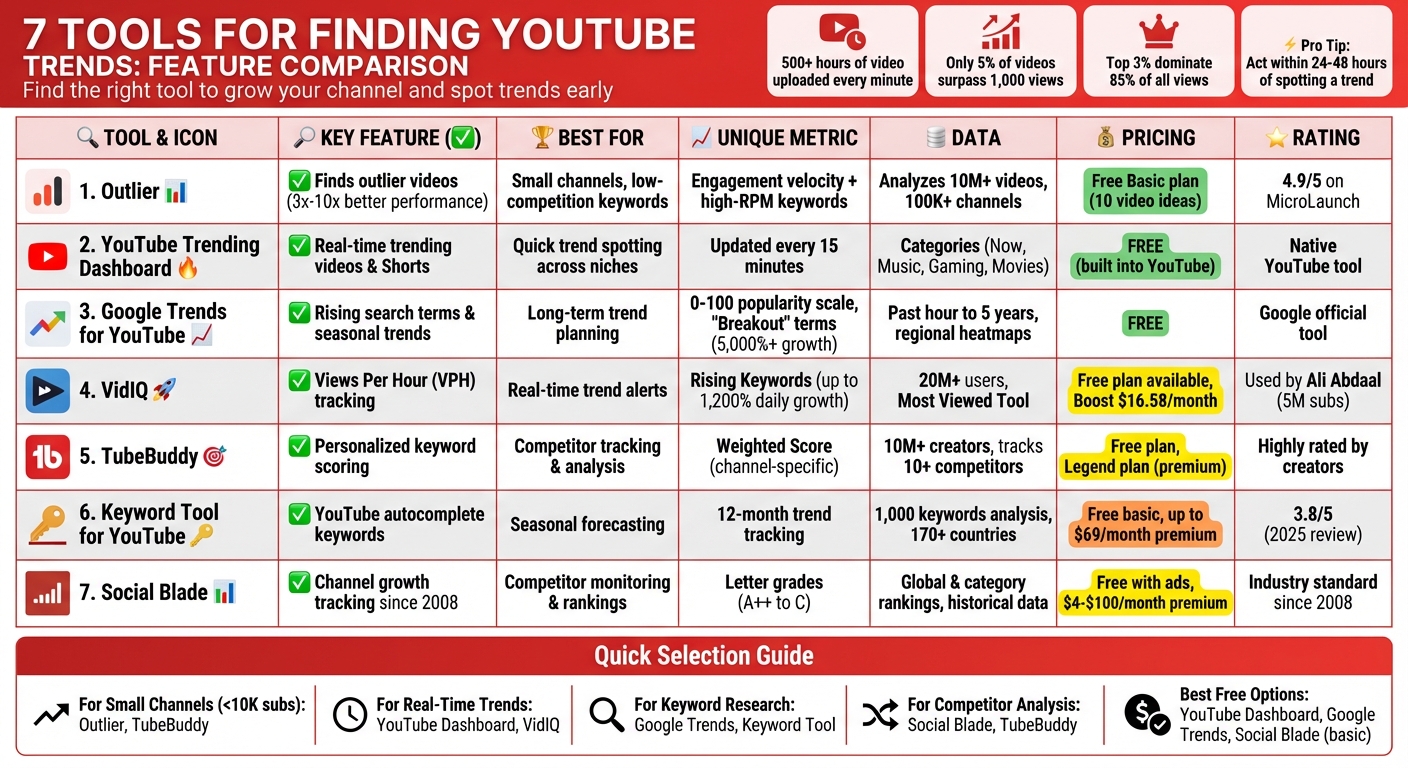
7 YouTube Trend Tools Comparison: Features, Pricing & Best Use Cases
How To Find Trending Topics On YouTube - The Easy Way
sbb-itb-08cadfc
1. Outlier
Outlier zeroes in on "outlier videos" - those that perform 3× to 10× better than average. By analyzing over 10 million videos and 100,000 channels, it identifies content patterns that creators can replicate for success.
Spotting Trends Early
Instead of just counting views, Outlier uses its proprietary AI to measure engagement velocity and long-term performance. This lets it pinpoint emerging topics before they become oversaturated. For smaller channels, its low-competition keyword finder is a game-changer, helping identify high-demand topics without competing against top creators. Plus, it highlights high-RPM keywords - those that generate more ad revenue per view - so you can boost earnings without solely chasing views.
Understanding Competitors
Outlier takes competitor analysis to another level. It breaks down successful videos, analyzing elements like hook strength, pacing, and audience retention. This helps identify niche gaps and overlooked topics. YouTube strategist Gautham shared:
"OutlierKit is the first tool that actually improved our view counts almost instantly. The competition analysis revealed gaps we never knew existed".
Tailored Recommendations
The platform personalizes its suggestions by creating detailed audience personas based on viewer interests. It even filters recommendations by channel size and generates 30–60 days of niche video ideas, complete with titles, hooks, and thumbnail concepts.
Pricing and Feedback
Outlier offers a free Basic plan, which includes 10 personalized video ideas. It holds an impressive 4.9/5 rating on MicroLaunch, with users praising its ability to uncover keywords that smaller channels can realistically rank for.
2. YouTube Trending Dashboard
The YouTube Trending Dashboard, found under the platform's Explore tab, is a free tool that highlights the most popular videos and Shorts. Updated every 15 minutes, it offers a real-time snapshot of what's capturing attention across YouTube. Let’s break down how this feature helps identify trends.
How Trends Are Identified
YouTube uses a mix of metrics to determine trending content, including view count, growth rate, origins, and how recently the video was uploaded. This method ensures that both widely viewed and rapidly growing videos make it to the trending list.
The dashboard also organizes content into categories like Now, Music, Gaming, and Movies. This makes it easier to focus on specific niches. For instance, a gaming creator can explore the Gaming tab to uncover emerging topics that align with their content.
Gaining Insights Through Data
To leverage trends effectively, examine elements like thumbnails, titles, descriptions, and comments. These can reveal what drives engagement. Since trends can be short-lived, it’s smart to create and publish related content within 24–48 hours of spotting a rising topic. However, instead of simply copying what’s trending, add your own perspective to stand out. This approach not only taps into current viewer interest but also helps you create content that feels fresh and relevant to your audience.
3. Google Trends for YouTube
Google Trends isn't just for general web searches - it can be a goldmine for YouTube creators looking to tap into what people are actively searching for. By switching the filter to "YouTube Search," you can uncover trends specific to video content. Since search behaviors on YouTube often differ from broader web searches, this tool helps creators tailor their content to what viewers actually want to see.
Spotting Trends That Matter
Google Trends uses a normalized scale from 0 to 100 to show the relative popularity of search terms over time. Keep an eye out for "Breakout" terms, which indicate searches that have skyrocketed by over 5,000% within a given timeframe. The "Rising" tab highlights terms gaining momentum recently, while the "Top" tab shows the most frequently searched queries overall.
You can refine your results by selecting specific timeframes - like the past hour, 30 days, or even the last 5 years. This helps you separate short-lived fads from long-term trends. Additionally, the Category filter lets you focus on niche areas like Food & Drink or Fitness, making it easier to find relevant topics for your channel.
Visualizing Data for Better Insights
The interest-over-time graph is a handy tool for understanding whether a topic is gaining traction, losing steam, or holding steady. Regional heatmaps add another layer of insight by showing where certain topics are most popular, which can help you target viewers in specific cities or states. Meanwhile, the Related Queries section offers a peek into the exact questions people are asking - perfect for brainstorming video titles or themes.
Seasonal trends are another area where Google Trends shines. For instance, fitness-related searches tend to spike in January. If you publish your content 24–48 hours before this peak, you can capitalize on the increased interest. The tool also allows you to compare up to five terms side by side, making it easier to decide which topic resonates most with your audience right now.
4. VidIQ
VidIQ is a powerful tool designed to help creators identify emerging YouTube trends by going beyond traditional metrics. With over 20 million users, VidIQ introduces the Views Per Hour (VPH) metric, which tracks how quickly videos gain traction. This approach allows creators to spot trends early, rather than just relying on total view counts.
Trend Identification Capabilities
VidIQ offers several features to help creators stay ahead of the curve. The Most Viewed Tool provides a real-time feed of high-performing videos, which can be filtered by category, country, or channel size. Another standout feature, Rising Keywords, highlights search terms that are skyrocketing in popularity - some growing by as much as 1,200% in a single day. This tool also provides search volume, competition scores, and growth percentages, making it easier to choose topics with strong potential. For added convenience, Trend Alerts notify you via email when your selected keywords hit a specific VPH threshold.
Competitor Analysis Features
VidIQ’s Outliers Tool is particularly useful for analyzing competitors. It identifies videos that are performing unusually well for a channel, offering creators a blueprint for what works. For example, you can filter results to focus on channels with fewer than 10,000 subscribers, helping you uncover ideas that are achievable without needing a massive audience. This targeted approach ensures creators can focus on realistic goals while avoiding oversaturated niches. Additionally, VidIQ allows users to track specific competitors, analyze their top-performing videos, and export effective keywords to improve search rankings.
"vidIQ's extension and keyword research tools have helped me discover new opportunities on YouTube."
– Ali Abdaal, YouTuber with 5M Subscribers
Personalization of Recommendations
VidIQ also uses AI to deliver tailored suggestions. The Daily Ideas feature recommends three video topics each day based on your channel’s existing content. Each idea comes with a performance rating - ranging from Low to Very High - so you can focus on topics with the most growth potential. While VidIQ offers a free plan with limited keyword suggestions, its Boost plan, priced at $16.58/month (billed annually), unlocks advanced features like comprehensive keyword research and competitive insights.
5. TubeBuddy
TubeBuddy stands out by using detailed data analysis to provide recommendations tailored specifically to your channel's history and performance. With over 10 million creators relying on it, this tool predicts trends that can work for you, offering personalized scoring and competitor tracking to keep you ahead of the curve.
Trend Identification Capabilities
TubeBuddy’s Keyword Explorer dives deep into search data from YouTube and Google, analyzing trends over the past 30 days and 12 months. It uses two key metrics: an Unweighted Score for overall popularity and a Weighted Score to gauge how well a trend aligns with your channel's potential. This tailored approach ensures you're focusing on trends you can realistically rank for, saving you time and effort.
The platform also highlights Trending Tags and tracks top creators through its Niche Leaderboard, giving you the chance to act on rising trends within 24–48 hours.
"TubeBuddy is like having a YouTube expert on staff who will give you advice and direction whenever you need it." – Karin Carr, YouTube Creator
Competitor Analysis Features
TubeBuddy goes beyond trend tracking with its Competitor Analysis Tool, allowing you to monitor up to 10 rival channels (or more with the Enterprise plan). You can compare metrics like lifetime views, subscriber growth, upload frequency, and average views per video side-by-side. The Competitor Scorecard visually pinpoints moments of growth for your competitors, helping you identify which videos or topics contributed to their success.
Real-time alerts notify you the moment a competitor uploads new content, so you can quickly adjust your strategy to stay competitive. Additionally, the Content Calendar reveals their posting patterns, helping you find the best times and opportunities to publish your own content.
Personalization of Recommendations
TubeBuddy’s tools don’t stop at analysis - they actively help you optimize your content. Click Magnet identifies your most engaging videos to improve click-through rates, while Suggested Shorts uses AI to extract compelling moments from your videos for YouTube Shorts.
The platform offers a free plan with basic features, but upgrading to the Legend plan unlocks advanced tools like Click Magnet, A/B testing, and full access to the Niche Leaderboard. Whether you’re just starting out or looking to refine your strategy, TubeBuddy delivers tools to help your channel grow.
6. Keyword Tool for YouTube
Keyword Tool for YouTube is designed to pull keyword suggestions straight from YouTube's autocomplete feature. It generates thousands of ideas, neatly organized into categories like questions, prepositions, and hashtags.
Trend Identification Capabilities
One standout feature is its Trends column, which tracks keyword popularity over the past 12 months. The "Check Search Volume" option allows users to analyze up to 1,000 keywords, incorporating Google Trends data to reveal search volume, cost-per-click (CPC), and competition levels. This combination helps identify high-potential topics. Seasonal forecasting graphs are particularly useful, showing predictable spikes in interest. For example, if a keyword consistently trends upward every December, you can plan content in November to capitalize on the surge.
"Keyword Tool gets its keywords directly from YouTube autocomplete, so you can use these keywords with confidence, knowing that they are authentic." – Keyword Tool Blog
Data Visualization and Insights
The tool enhances its trend analysis with easy-to-understand visual data. While it doesn’t offer automated competitor analysis, you can manually extract keywords from a rival's video titles, descriptions, hashtags, and even closed captions. Plus, its filtering options span over 170 countries and multiple languages, making it easier to target specific geographic audiences.
In a 2025 review, the platform earned a 3.8 out of 5 rating. Users appreciated its straightforward interface and quick keyword generation but noted its 4 out of 10 score for data accuracy, as the tool provides estimates rather than exact figures. The free version offers basic keyword suggestions, while premium plans - priced up to $69 per month - unlock features like search volume and competition metrics. These tools help creators fine-tune their content strategies to align with YouTube's ever-changing trends.
7. Social Blade
Social Blade has been tracking YouTube statistics since 2008. It’s a powerful tool for monitoring channel growth, helping creators and marketers keep tabs on how quickly channels gain views and subscribers. This makes it easier to spot trending content as it happens.
Spotting Trends
Social Blade provides both global and category-specific rankings, such as "Entertainment" or "US Rank", to highlight the top-performing creators. Its "Similar Channels" feature is especially useful for keeping an eye on competitors, showing channels with rapid subscriber growth and helping users identify emerging trends.
Analyzing Competitors
To make comparison easier, Social Blade assigns each channel a letter grade (ranging from A++ to C) and a numerical rank. It offers access to both real-time and historical data for any public YouTube channel, including key metrics like subscriber counts, total views, and upload frequency. For those curious about potential revenue, the platform includes a "YouTube Money Calculator" that provides estimated earnings ranges. However, these estimates are broad since CPM rates can vary widely.
Visualizing Data
Social Blade turns its data into easy-to-read charts and graphs, helping users quickly understand growth trends. Its "Top Lists" feature curates rankings of leading creators, allowing users to filter by country, category, or Social Blade rank. This makes it simple to find trending channels in a specific market. While the free version offers basic stats with ads, premium plans (ranging from $4 to $100 per month) unlock more detailed, ad-free insights.
Conclusion
YouTube trends aren’t just random - they’re backed by data. In fact, 95% of videos get fewer than 1,000 views, which makes having the right tools a game-changer. Each tool on this list brings something unique to the table, whether it’s spotting outliers, researching keywords, tracking competitors, or finding untapped niches.
Take advantage of free trials to figure out which tool aligns with your channel’s size and goals. If you’re a smaller creator, focus on tools that let you filter results by subscriber count (like channels with 10,000–100,000 subscribers). This way, you can find strategies that are achievable for your level rather than trying to compete with massive creators. As Uttaran Samaddar from vidIQ wisely points out:
"The biggest mistake new creators make is comparing themselves to mega-creators who have unlimited resources... That comparison isn't just unfair - it's useless"
Using this approach, you can zero in on the tool that best helps you spot trends in your niche. Start with free trials to get a feel for the interfaces and features. Keep an eye on whether browser extensions slow you down - if so, a web-based option might be a better fit. And whenever you spot a trend, act fast - jumping on it within 24–48 hours can dramatically boost your chances of reaching new viewers.
FAQs
How can I use these tools to find YouTube trends early?
To stay ahead of YouTube trends before they hit their peak, it’s all about using the right tools together as part of a cohesive process. Start with Google Trends to pinpoint rising search terms within its YouTube-specific view. Look for terms showing sharp upward movement or marked as "rising" - these often hint at topics gaining traction. Then, cross-reference your findings with YouTube’s Trending tab and "Trending Searches" to see if the buzz carries over to the platform.
Next, leverage tools like Outlier to dig into competitor content and identify which videos are performing well in your niche. Outlier offers practical insights, including title suggestions, engaging hooks, and confidence scores, helping you tailor your content to align with what’s currently resonating.
Lastly, keep an eye on social media platforms like X (formerly Twitter) and TikTok, as viral topics there often spill over to YouTube. By regularly combining these tools and monitoring trends, you can stay ahead of the curve and position your channel for growth.
How can Outlier help small YouTube channels grow?
Outlier brings AI-powered tools to the table, specifically designed to help smaller YouTube creators grow their channels more effectively. By analyzing millions of videos, it pinpoints top-performing content in your niche, allowing you to focus on strategies that work without going head-to-head with massive creators.
The platform offers low-competition keyword suggestions and identifies high-RPM keywords, making it easier for smaller channels to rank for less-saturated topics while boosting ad revenue. It even breaks down the first 15 seconds of successful videos, providing ready-made hooks and titles to grab viewers' attention instantly. With its trend predictions and personalized insights, Outlier helps creators identify rising topics early, giving them a head start.
Outlier also compares new ideas with your channel’s past performance, ensuring its recommendations are not only actionable but tailored to your specific growth potential. This makes it a smart choice for creators looking to grow efficiently without overspending.
How can I choose the best tool to find YouTube trends for my channel?
To pick the right trend tool for your channel, start by considering your niche, channel size, and overall goals. If your niche is highly specific, look for tools that can uncover low-competition keywords with strong earning potential and analyze why certain videos succeed in your category. For smaller channels, focus on tools that spotlight trends suited for creators at your level, helping you adopt successful ideas without directly competing with larger, more established channels. If all you need is a quick snapshot of trending topics, free tools with real-time data might do the trick, though they often lack advanced features like competitor analysis.
When evaluating options, pay attention to factors like cost (in USD), user-friendliness, and whether the tool includes features like niche-focused keyword insights, outlier detection, or AI-powered suggestions. Aligning these capabilities with your channel’s growth stage and content strategy can make all the difference in expanding your audience and boosting your revenue.


