

Top 5 Tools for YouTube Competitor Video Analysis
YouTube is crowded - 2.4 million videos are uploaded daily, and 95% of them fail to hit 1,000 views. Why? Many creators skip data-driven strategies and rely on guesswork. The fastest-growing channels? They analyze competitors to find trends, content gaps, and winning strategies. Here are 5 tools to help you understand your competition, improve your content, and grow your channel:
- Outlier: Focuses on identifying high-performing competitor videos and content gaps. Starts at $9/month.
- TubeBuddy: A browser extension with tools like competitor benchmarking and A/B testing. Plans start at $4.50/month.
- VidIQ: Offers real-time analytics, keyword research, and competitor tracking for up to 20 channels. Starts at $7.50/month.
- Social Blade: A free, web-based tool for tracking channel growth and global rankings. Paid plans start at $3.99/month.
- Tubics: Specializes in content auditing and keyword tracking with custom pricing options.
Quick Comparison:
Tool
Starting Price
Best Feature
Max Competitor Tracking
Outlier
$9/month
Outlier video detection
Custom
TubeBuddy
$4.50/month
A/B testing for thumbnails
10 channels (Legend plan)
VidIQ
$7.50/month
Real-time analytics
20 channels (Pro plan)
Social Blade
Free
Historical channel stats
Unlimited (free)
Tubics
Custom pricing
Content auditing
Custom
These tools make competitor analysis easier, helping you spot trends, refine content, and grow your audience. Whether you're a small creator or a business, there's an option to fit your needs and budget.
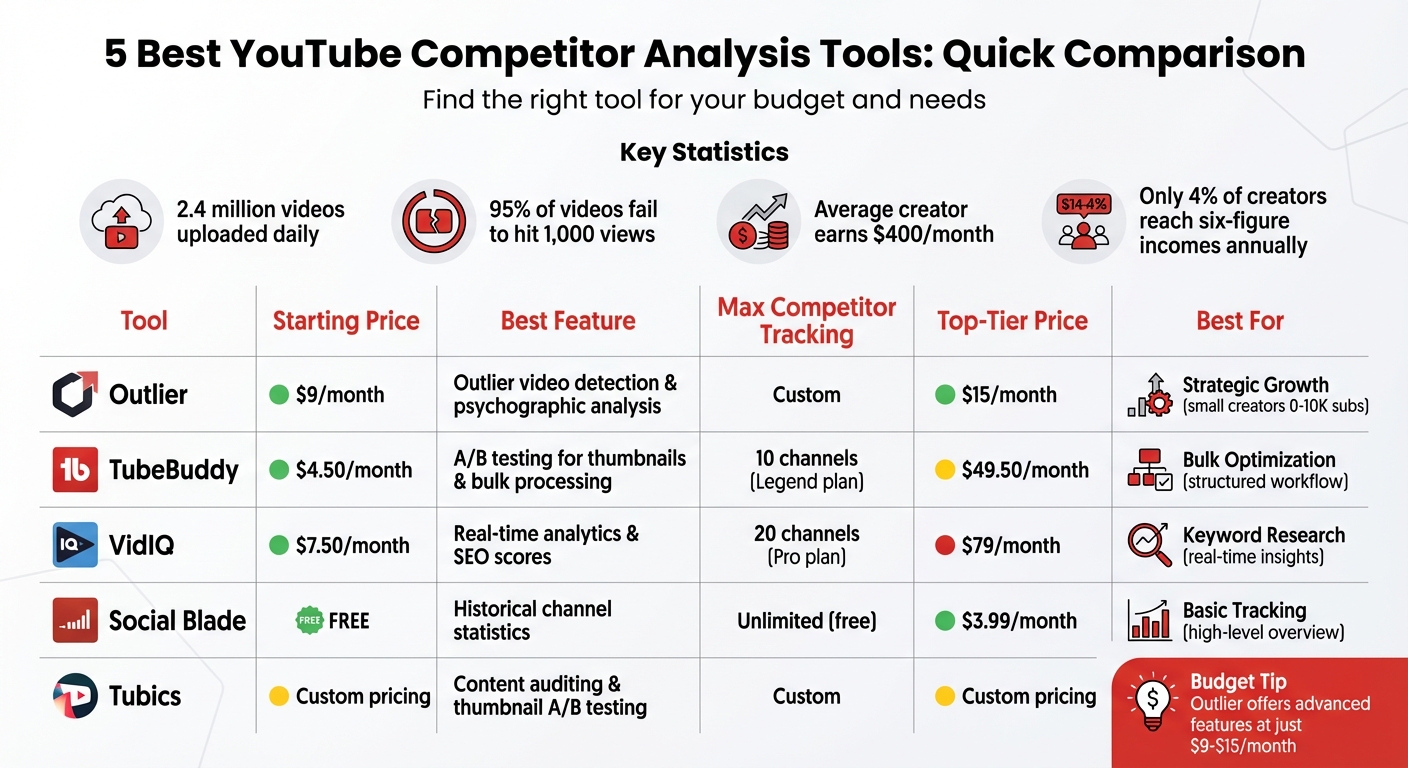
YouTube Competitor Analysis Tools Comparison: Features and Pricing
How To SPY On YouTube Competitors & Grow Your Channel 👀
1. Outlier
Outlier is designed to spotlight videos that outperform a channel’s average by 3 to 10 times, helping creators identify winning trends without drowning in unnecessary data.
With an impressive track record of analyzing 100,000 channels and 10 million videos, Outlier has uncovered over 1 million outliers. Creators who’ve implemented its recommendations have reported a 50–70% boost in video performance.
Key Features
Outlier dives deep into what makes videos successful. Its script-level performance analysis dissects competitor videos, identifying exactly where hooks and retention rates fall short. The psychographic audience analysis offers a detailed look at competitor audiences, including their preferred video lengths, content styles, and formats. Paired with niche gap analysis, it uncovers untapped topics and low-competition keywords, giving creators a competitive edge.
Additionally, Outlier tracks growth trends over 30-day and 90-day periods, revealing whether competitor channels are growing, stable, or declining - and which specific videos are driving those changes.
As Gautham, a creator managing multiple channels, noted:
"OutlierKit is the first tool that actually improved our view counts almost instantly. The competition analysis revealed gaps we never knew existed."
These features make Outlier a powerful tool for creators at any level.
Pricing and Plans
Outlier’s free Basic plan offers 10 personalized video ideas, complete with suggested titles, hooks, and confidence scores - perfect for creators seeking a quick competitor overview. For more advanced analysis and features, premium plans are available. For the most up-to-date pricing details, visit the Outlier website.
Use Cases
Outlier is especially effective for small creators with 0–10K subscribers who need actionable insights without the complexity of overwhelming dashboards. It’s also a game-changer for businesses leveraging YouTube for lead generation, as it identifies high-RPM keywords to boost ad revenue.
Swapnil, a content creator, shared his experience:
"The script analysis feature is incredible. It showed me exactly why my hooks weren’t working. Fixed it, and my numbers improved dramatically."
2. TubeBuddy
TubeBuddy is a browser extension that seamlessly integrates with YouTube Studio, offering creators tools for competitor analysis without interrupting their workflow.
Competitor Benchmarking
The Competitor Scorecard lets you compare your channel against up to 10 competitors, showcasing key growth metrics and revealing when competitors experience spikes in performance. By identifying these growth surges, you can analyze and replicate their strategies. Users on the Legend plan can track 10 competitors simultaneously, while Enterprise users get unlimited tracking.
With real-time upload alerts, you’ll receive notifications via email, text, or in-app within minutes of a competitor posting new content. This feature helps creators quickly act on emerging trends before they become oversaturated.
Key Features
TubeBuddy’s Videolytics tool provides insights into competitor tags, SEO scores, and engagement stats. Features like Search Rank Tracking and the Keyword Explorer help you discover keywords with high potential. The "Compare" button allows you to benchmark your videos against competitor content, highlighting areas for improvement. For SEO scores, hovering over the details offers actionable tips based on strategies used by top-ranking videos.
As creator Karl Oftebro shared:
"Once it got my videos ranking #1 in search I was hooked."
Pricing and Plans
TubeBuddy’s Pro Plan starts at $4.00/month (or $3.20/month if billed annually), offering basic optimization tools and search rank tracking. The Legend Plan, priced at around $49.00/month, includes advanced tracking for up to 10 channels and A/B testing features. For larger operations, Enterprise pricing is customized. A free version is also available, providing limited access to Videolytics and basic tools.
Use Cases
TubeBuddy is ideal for creators seeking a structured approach to channel optimization and competitor insights. The A/B testing feature is perfect for fine-tuning thumbnails and titles, while tools like the Keyword Explorer and bulk processing save time for channels aiming to grow.
That said, some users have reported occasional slow performance and a somewhat cluttered interface. Despite these drawbacks, TubeBuddy maintains a strong user rating, ranging from 4.3 to 4.6 out of 5 across various review platforms.
3. VidIQ
VidIQ, launched in 2011, is one of the original tools designed to optimize YouTube SEO. It integrates seamlessly into YouTube’s interface, offering real-time competitor analytics, and has earned over 20,000 5-star reviews.
At its core, VidIQ provides powerful tools for analyzing competition and improving content strategies.
Competitor Benchmarking
VidIQ stands out for its competitive analysis capabilities. It allows you to track up to 20 competitors and provides key metrics such as total views, subscriber growth, and video count. You can view these stats over various timeframes, including 7, 14, 28, 30, or 60 days, as well as year-long trends. The tool also features VPH (Views Per Hour) tracking, which helps identify trending videos in real time.
Another highlight is the Top Videos Analysis tool, which showcases a competitor’s best-performing content, complete with thumbnails, titles, and engagement statistics. Plus, with just one click, you can export top-performing keywords to refine your own SEO strategy.
Key Features
VidIQ offers detailed analytics and SEO scores directly on YouTube pages. Its Channel Stats Analysis delivers in-depth data on competitor performance, covering metrics like average daily views and growth rates across multiple timeframes.
The platform also includes Trend Alerts, which notify you about rising topics or competitors, enabling you to act quickly.
Ali Abdaal, a YouTuber with 5 million subscribers, praised VidIQ’s tools, saying:
"vidIQ's extension and keyword research tools have helped me discover new opportunities on YouTube."
Entrepreneur and investor Mark Cuban also endorsed the platform:
"vidIQ has an awesome suite of services. I recommend all of my companies use it for YouTube."
Pricing and Plans
VidIQ offers several pricing tiers to suit different needs:
- Free Plan: Includes basic analytics, 3 keyword lookups per day, and competitor tracking for up to 3 channels.
- Pro Plan: Priced at $7.50/month, it expands tracking to 20 channels and provides enhanced keyword tools .
- Boost Plan: At $39/month, this plan adds AI-powered features and brand alerts.
- Max Plan: For $79/month, it offers agency-level tools and priority support.
Use Cases
VidIQ is perfect for creators looking for real-time competitor insights without leaving YouTube. The VPH metric is particularly helpful for identifying trending topics - if a competitor’s video shows high VPH compared to their subscriber count, it’s often a sign of a high-demand subject. Additionally, exporting competitor keywords can reveal content opportunities where others are excelling.
With its mix of real-time data and detailed competitor metrics, VidIQ complements other tools discussed in this article.
The platform enjoys strong user ratings, with a Trustpilot score of 4.3/5 from over 1,210 reviews and a Capterra rating of 4.6/5. However, some beginners may find the detailed interface slightly overwhelming, which could affect performance.
sbb-itb-08cadfc
4. Social Blade
Social Blade has been tracking creator statistics since 2008 and currently monitors over 87 million YouTube channels. Unlike browser extensions, this is a web-based platform that offers quick snapshots of any public channel's performance. While it provides a high-level overview, it pairs well with more specialized tools for deeper insights into competitor performance.
Competitor Benchmarking
Social Blade assigns every channel a grade (A++, B, C, D) based on its overall influence and performance metrics. This grading system makes it easy to assess a competitor's channel health at a glance. It also ranks channels globally and by category, covering metrics like subscriber count, total views, or specific niches such as Entertainment or Gaming.
The platform uses current growth rates to predict future subscriber and view numbers for any channel. Features like "Similar Channels" and side-by-side comparisons help you quickly identify competitors and analyze their performance within your niche.
Key Features
Social Blade provides historical data tracking with daily, weekly, and monthly statistics for subscribers and views. This feature allows you to pinpoint specific days when a competitor experienced noticeable growth, which can be cross-referenced with their video uploads to identify potential strategies.
The platform also offers estimated earnings ranges based on view counts. However, YouTube has clarified that "Third party apps, such as SocialBlade, do not accurately reflect subscriber activity". These estimates are rough and not intended for precise financial planning.
Another handy feature is live subscriber counts, particularly useful during major events or launches to monitor real-time audience reactions. Beyond YouTube, Social Blade supports multi-platform tracking across TikTok, Twitch, Facebook, and Instagram, making it a versatile tool for cross-platform analysis.
Pricing and Plans
Social Blade’s basic service is free, providing access to analytics, rankings, and historical data. This makes it a practical option for creators looking to gain quick insights without spending money.
For advanced features, paid plans start at $3.99 per month and go up to $100 per month. Premium memberships remove ads, allow for extended favorites lists to track multiple channels, and include CSV data exports. Businesses can also access a dedicated API to integrate Social Blade data into their systems.
The platform has a G2 rating of 4.2/5 for its basic channel tracking capabilities. Users appreciate its quick snapshots and global ranking system, though some have noted that the free version’s interface can feel cluttered with ads.
Use Cases
Social Blade is best suited for high-level overviews, making it a great starting point to evaluate a competitor’s growth trajectory and channel size. For instance, the "Daily Channel Metrics" table helps you spot unusual activity patterns, which you can investigate further to understand what content led to performance spikes. The "Top Lists" feature is another valuable tool, helping you identify top-performing channels in specific categories or countries to set realistic growth benchmarks.
That said, Social Blade focuses on showing what has already happened. It doesn’t provide actionable guidance or tools like keyword research, SEO insights, or detailed content analysis that are available in more advanced platforms. However, when paired with tools like Outlier and VidIQ, Social Blade becomes a key part of a well-rounded competitor analysis strategy.
5. Tubics
Tubics takes a deep dive into data, focusing on thorough content audits and strategic optimization instead of just offering quick snapshots of metrics. While it may not be as widely recognized as some bigger names, Tubics provides specialized tools to help creators uncover what’s fueling their competitors' success.
Competitor Benchmarking
Tubics offers a detailed analysis of rival YouTube channels, exploring every aspect of their content strategies. By pinpointing competitors in your niche and examining their performance, the platform helps you gain valuable insights. You can create competitor profiles by adding specific channel URLs, allowing Tubics to track their progress over time.
Its keyword tracking feature is particularly useful, showing you the exact search terms your competitors are targeting and ranking for. This gives you a chance to identify gaps in your own keyword strategy and spot new opportunities. These insights lay the groundwork for Tubics' advanced optimization tools.
Key Features
What sets Tubics apart is its strong focus on content auditing. It goes beyond surface metrics to uncover why competitor videos perform well. The platform also includes an A/B testing feature for thumbnails, allowing creators to optimize visuals based on data.
Tubics combines keyword tracking to improve search rankings with actionable recommendations for content optimization. Instead of focusing solely on real-time metrics, it provides a more deliberate and detailed analysis of content performance.
Use Cases
For creators who prioritize strategic research, Tubics is a powerful ally. It helps identify performance gaps while offering tools to refine your content. By leveraging its competitor analysis and A/B testing for thumbnails, you can fine-tune your channel for better engagement. Setting up competitor profiles also allows you to track market trends over time, helping you make smarter, data-driven decisions about your channel’s future direction.
Feature and Pricing Comparison
Finding the right tool for your needs and budget can be challenging, especially when each platform brings something different to the table. To make things easier, here’s a breakdown of features and pricing for some popular competitor analysis tools:
Tool
Starting Price
Best For
Key Strength
Top-Tier Price
Outlier
$9/month
Strategic Growth
Outlier detection and psychographic analysis
$15/month
TubeBuddy
$4.50/month
Bulk Optimization
A/B testing and bulk processing
$49.50/month
VidIQ
$7.50/month
Keyword Research
Real-time analytics and SEO scores
$79/month
Social Blade
Free
Basic Tracking
Historical channel statistics
$3.99/month
Tubics
Custom pricing
Content Auditing
Thumbnail A/B testing and keyword tracking
Custom pricing
Each tool caters to a specific need, and their pricing reflects their focus. For example, Outlier emphasizes advanced analytics like outlier detection and psychographic analysis, starting at just $9/month. TubeBuddy, starting at $4.50/month, is great for bulk optimizations like A/B testing, but its full features require the Legend plan at $49.50/month. VidIQ offers robust keyword research and real-time insights, starting at $7.50/month, with its highest-tier plan priced at $79/month. Meanwhile, Social Blade provides free basic tracking with ad-free options starting at $3.99/month. If you're interested in more tailored solutions, Tubics offers custom pricing for its content auditing tools.
For creators on a tight budget, Outlier stands out by delivering advanced features at just $9–$15/month, making it a budget-friendly option compared to competitors’ higher-tier plans. This is especially relevant considering that the average content creator earns around $400 per month, with only 4% reaching six-figure incomes annually.
One additional consideration: VidIQ and TubeBuddy rely on browser extensions, which may slow down YouTube performance. In contrast, Outlier’s web-based platform avoids this issue entirely. For agencies managing multiple channels, VidIQ’s Max plan at $79/month could be worth the investment, but it’s definitely on the pricier side.
Conclusion
Competitor video analysis tools take the guesswork out of content creation, replacing it with precise, data-driven strategies. In today’s competitive environment, relying solely on intuition leaves creators at a disadvantage. The right tool can help you uncover content gaps, spot high-performing videos, and understand what truly resonates with your audience - all before you even hit record. Success in this space requires tools that not only measure performance but also provide clear direction for your next steps.
When choosing a tool, consider your channel's size and goals. For smaller creators, tools that highlight untapped opportunities through clear, actionable strategies are invaluable. Meanwhile, larger channels juggling multiple projects may prioritize features like bulk optimization and A/B testing. And with many creators earning around $400 per month on average, balancing affordability with meaningful insights is crucial.
"No SEO tools can rank your videos if your content isn't good enough. Your videos won't magically start ranking on YouTube if your content is of poor quality." – OutlierKit Blog
Before committing to a paid tool, explore free benchmarking options to assess your needs. Start with YouTube Studio for basic insights, and take advantage of free trials from paid platforms to see if their features align with your workflow. For the most relevant competitor analysis, focus on channels within a 10× subscriber range of your own.
At the end of the day, the best tools are those that turn raw data into actionable steps. Whether you're looking for keyword research, thumbnail optimization, or deeper audience insights, the right tool can make all the difference in helping your videos stand out.
FAQs
How can these tools help uncover content opportunities on YouTube?
YouTube competitor analysis tools are a game-changer when it comes to uncovering content opportunities. They analyze what viewers are searching for but not finding enough of, giving you a clear edge. These tools sift through thousands of videos in your niche to pinpoint trends, under-served topics, and formats that perform well - insights you can use to refine your strategy.
Take tools like Outlier, for example. They focus on key areas such as:
- Identifying low-competition keywords by comparing search volume to the number of existing videos.
- Spotting emerging trends by tracking videos that are quickly gaining popularity in under-served categories.
- Breaking down successful hooks and video structures to help you improve your own content approach.
Armed with these insights, you can tap into fresh ideas, create videos that align with what your audience is craving, and stay ahead of the curve in your niche.
How do the prices of YouTube analysis tools compare?
Pricing for YouTube analysis tools can differ widely depending on the features and subscription options. Some tools have entry-level plans starting at just $9 per month, while others begin around $23 per month or more. For those looking for advanced features and deeper insights, prices can climb to $49 per month or higher.
When deciding on a tool, think about your budget and the features that matter most to you. Typically, higher pricing reflects more robust capabilities and detailed analytics. To ensure you're getting the most up-to-date information, always review pricing directly on the tool's official website.
What’s the best tool for small YouTube creators on a budget?
If you're a small creator searching for a budget-friendly and efficient tool, Outlier might be just what you need. This platform delivers customized, data-backed YouTube video ideas by examining competitor content and spotting trends. Within minutes, you'll receive practical suggestions, including video titles, attention-grabbing hooks, confidence scores, and relevant data to back them up.
With a free trial available, Outlier is tailored for creators working with tight budgets, helping them identify "winnable" opportunities without committing to pricey subscriptions. It's an affordable way to expand your channel while keeping costs in check.


