

How to Track Competitor Engagement on YouTube
Tracking competitor engagement on YouTube helps you understand what works in your niche and improve your own strategy. By analyzing metrics like views, likes, comments, shares, and watch time, you can identify successful content patterns, audience preferences, and gaps in your approach. Here's how to get started:
- Key Metrics: Focus on engagement rate (ER), watch time, subscriber growth, and comment sentiment. High-performing videos often outperform a channel’s average by 5–10 times.
- Competitor Identification: Use YouTube's "Research" and "Audience" tabs, suggested videos, and comment sections to find channels within your niche.
- Data Collection: Track metrics manually by reviewing competitors' videos or automate the process with tools like vidIQ, TubeBuddy, or Outlier.
- Analysis: Spot trends in high-engagement videos, study audience sentiment in comments, and evaluate competitors’ hooks, pacing, and formats.
Key Competitor Engagement Metrics to Track
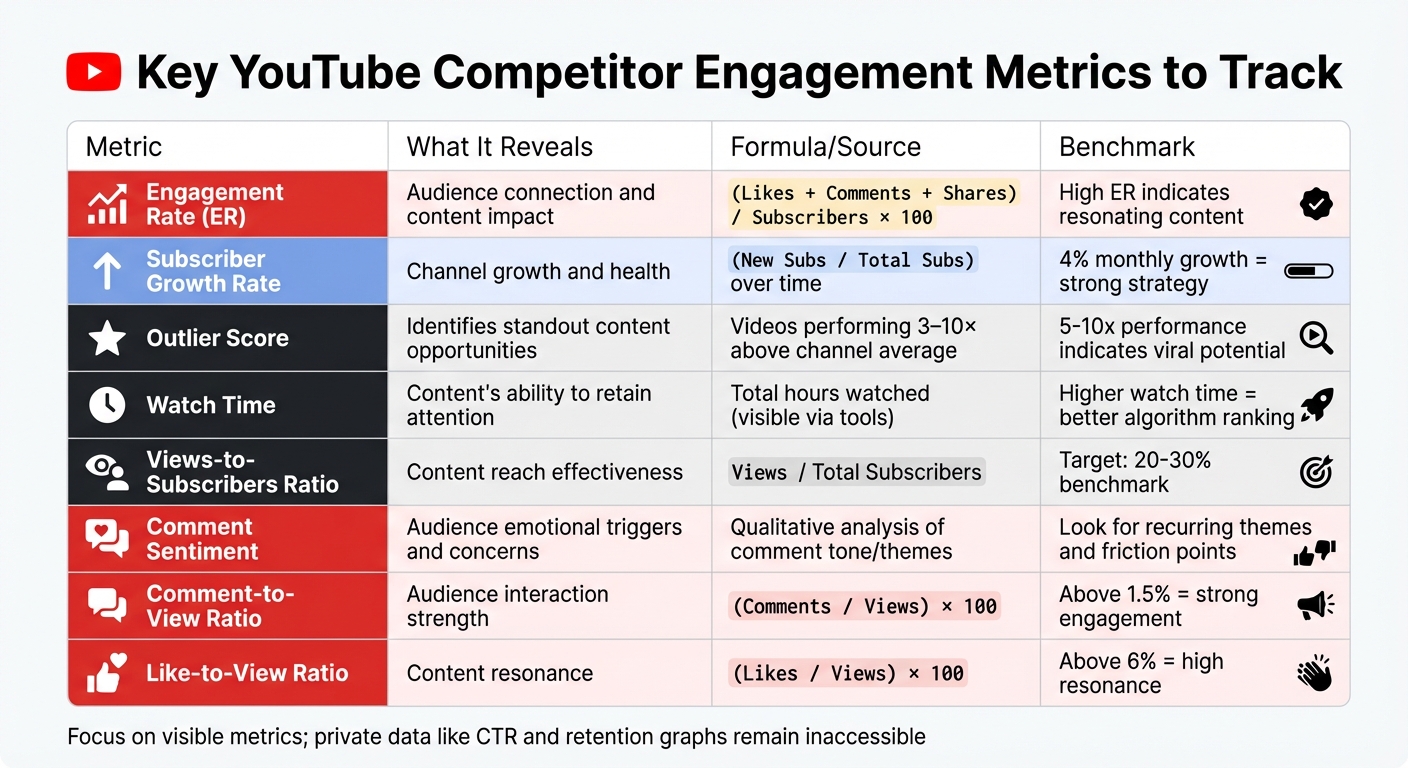
Key YouTube Competitor Engagement Metrics to Track
Engagement Metrics to Monitor
When analyzing competitors, Engagement Rate (ER) should be a top priority. To calculate it, add up likes, comments, and shares, divide by the total number of subscribers (or views), and multiply by 100. A high ER indicates that the content strikes a chord with viewers and aligns with what they’re eager to engage with.
Metrics like views and watch time offer insights into how effectively competitors capture attention and gain visibility on YouTube. These factors also play a significant role in influencing the algorithm’s recommendations. Another key metric is the subscriber growth rate - a steady 4% monthly growth reflects a strong content strategy. Additionally, audience retention helps pinpoint where viewers stay engaged or drop off. Although retention graphs are private, you can analyze videos that perform 3–10 times better than the channel’s average to uncover what sets breakout content apart.
Comment sentiment dives deeper than just counting interactions. By evaluating the tone and themes of comments, you can uncover audience concerns and emotional triggers. Similarly, shares reveal the perceived value of the content - if viewers are sharing it, they see it as worth spreading beyond YouTube. Together, these metrics paint a clearer picture of what drives competitor success.
Once these metrics are understood, the next step is establishing benchmarks to put competitor performance into context.
Setting Benchmarks for Competitor Analysis
Using the identified metrics, create measurable benchmarks to track competitor performance over time. Start by organizing competitor data in a spreadsheet. Use U.S.-style date formatting (MM/DD/YYYY) to maintain consistency as you log performance trends. Aim to compare your channel against 5–7 competitors, including direct rivals (targeting the same audience with a similar product), indirect rivals (same audience but different product), and aspirational brands.
To establish realistic benchmarks, calculate average engagement rates across competitor videos. Focus on visible metrics like view counts, subscriber trends, and upload frequency since private data such as revenue (RPM), click-through rates (CTR), and audience retention graphs remain inaccessible. For example, Samsung’s ability to achieve higher watch time compared to Apple, despite having fewer subscribers, highlights the importance of engagement quality over just numbers.
Metric
What It Reveals
Formula / Source
Engagement Rate (ER)
Audience connection and content impact
(Likes + Comments + Shares) / Subscribers × 100
Subscriber Growth
Channel growth and health
(New Subs / Total Subs) over time
Outlier Score
Identifies standout content opportunities
Videos performing 3–10× above channel average
Watch Time
Content’s ability to retain attention
Total hours watched (Visible via tools)
How to Identify and Categorize Competitors
Building a Competitor List
Start by researching niche-specific keywords your target audience regularly searches for. Look at which channels consistently show up in top search results and on the Shorts shelf - these are likely your most visible competitors.
Next, head to YouTube Studio's "Research" tab to check out current viewer searches. The "Audience" tab is another goldmine - specifically the "Other channels your audience watches" section, which updates weekly. This feature highlights channels already sharing a chunk of your audience. Use the keywords from the Research panel to search YouTube again and identify competitors that appear repeatedly.
Another quick trick? Check the suggested videos sidebar on your watch pages. YouTube’s algorithm tends to recommend channels similar to yours, making this an easy way to spot direct rivals. As Lydia Sweatt, Blog Manager at vidIQ, explains:
"Competition is relative. Most creators aren't competing with MrBeast - at least not directly. It's the people standing on either side of them that they compete with."
To keep things realistic, focus on channels with subscriber counts within a 10x range of your own. Narrow your list to 5 to 10 channels that consistently upload content and overlap with your niche. Skip channels with erratic or abandoned upload schedules. Marketing expert Nia Patel also suggests digging into competitor comment sections:
"Your competitors' comment sections can also be a good place to go to because audience members may suggest ideas the competitor hasn't yet explored."
Classifying Competitors
Once you’ve built your competitor list, it’s time to organize it. Start by sorting channels into three main categories:
- Direct competitors: Channels targeting the same audience with similar content or products, like two fitness brands vying for the same viewers.
- Indirect competitors: Channels reaching the same audience but offering different content, such as a fitness brand versus a wellness influencer.
- Aspirational competitors: High-performing creators outside your niche who excel in areas like editing, storytelling, or innovative formats you’d like to replicate.
You can also classify competitors by format. For instance, identify channels that focus on Shorts versus those specializing in long-form storytelling. Another layer of classification involves engagement metrics. Separate “reach-heavy” channels (high views but low interaction) from what Iryna Avramenko of ScaleLab calls "loyalty machines" - smaller channels with highly engaged audiences. As she puts it:
"Sometimes, the smaller competitor is the one with real audience traction. If someone has 10K subs but pulls 1,000 comments on every video, they're a loyalty machine. Watch them closely."
Finally, track key details for each competitor in a spreadsheet. Include information like channel URL, upload frequency, content format, and channel age. Keep an eye on any strategic shifts, such as changes in upload schedules or content focus (e.g., moving from tutorials to mistake-based content). This data can help you spot trends before they become widespread.
How to Collect Competitor Engagement Data
Manual Data Collection
To start, visit your competitor's YouTube channel and head to the "Videos" tab. Here, you'll find two sorting options that provide valuable insights. By selecting "Most Popular", you can identify evergreen content - those videos that continue to attract views long after their upload. Switching to "Latest" helps you keep an eye on new uploads and spot emerging trends.
Keep track of important details like the video title, upload date (formatted as MM/DD/YYYY), views, likes, and comments in a spreadsheet. Use this data to calculate the engagement rate with the formula: (Likes + Comments) ÷ Views. Also, note the Views-to-Subscribers ratio, aiming for a benchmark of 20–30%. While you're collecting this data, take a moment to review the video's metadata, such as keywords, to understand their SEO strategy. Don't forget to check the Community tab for posts and polls - these often reveal how competitors engage their audience between uploads and test new ideas before committing to full videos.
If manual tracking feels too time-consuming, you can explore automation tools for a more efficient approach.
Using Tools for Automation
Manual tracking offers control, but automation can save time and improve efficiency, especially for ongoing monitoring. Tools like vidIQ and TubeBuddy are browser extensions that display real-time metrics directly on YouTube. For example, you can track Views Per Hour (VPH) to identify which videos are currently gaining traction, rather than just looking at lifetime views. Both tools offer tiered plans with additional features for competitor analysis.
For a broader perspective, web-based platforms like Social Blade provide free access to historical data on subscriber and view growth, which is helpful for benchmarking. For more advanced insights, platforms like Semrush's Social Tracker allow you to monitor metrics for up to 20 competitor channels in a single dashboard. Once you've exported data from these tools, you can use Excel Pivot Tables to identify patterns, such as which types of content - tutorials, reviews, etc. - consistently perform better.
To stay ahead, set up automated alerts with TubeBuddy. These notifications will let you know the moment a competitor uploads new content, ensuring you don’t miss trending topics during the crucial 24–48 hours when view velocity is at its peak.
Creating a Tracking Schedule
Once you've gathered your data, whether manually or through automation, establish a regular tracking schedule to monitor trends over time. Check weekly for new uploads, rising trends, and any changes in your competitors' content strategies.
On a monthly basis, dive deeper into the data. Look for long-term patterns, compare your growth against competitors with similar subscriber counts (within a 10x range), and pinpoint opportunities where your competitors might be falling short. Organize your findings in a structured spreadsheet with separate tabs for each competitor and a summary dashboard. This setup makes it easier to compare average views and engagement rates side by side, helping you identify which channels consistently perform better and why.
sbb-itb-08cadfc
How to Analyze Competitor Engagement Patterns
Identifying High-Engagement Trends
Start by identifying "outlier" videos - those that perform five to ten times better than a channel's average view count. These standout videos often highlight topics and formats that deeply connect with viewers. Once you've pinpointed these, break them down. Pay attention to the hook length (how quickly the video grabs attention), segment rhythm (how smoothly it transitions between sections), and the narrative payoff (the emotional or informational climax that keeps viewers engaged).
Instead of focusing solely on raw numbers, dive into engagement ratios. A comment-to-view ratio above 1.5% suggests strong audience interaction, while a like-to-view ratio over 6% indicates content that resonates well. These metrics can reveal loyalty levels that raw subscriber counts might miss. For example, a smaller channel with 10,000 subscribers but 1,000 comments per video may offer more actionable insights than a larger channel with weaker ratios.
Also, pay attention to shifts in a competitor's approach - like changes in upload frequency, video length, or format. These adjustments often reflect successful tests. Look for emerging format trends, such as the rise of "mistake-based" content (e.g., "Top 5 things you're doing wrong"), which has been shown to double views in certain niches. Additionally, examine their last 20 thumbnails for patterns in colors, bold text, or facial expressions that might correlate with spikes in views.
These trends provide a strong foundation for deeper insights, particularly when you dive into viewer comments.
Studying Comments and Audience Sentiment
The comment section is a goldmine of audience insights. Group comments into sentiment clusters - such as praise, complaints, confusion, or questions. Look for recurring themes. For instance, if multiple viewers ask for a more detailed take on a topic or request specific content, you've uncovered a potential content gap.
"Your competitors' comment sections can also be a good place to go to because audience members might suggest ideas that the competitor hasn't posted yet." - Nia Patel, Marketing Expert
Identify friction points - moments where viewers express frustration or confusion. These areas can highlight opportunities for you to create better alternatives. Also, take note of comments competitors pin, as these often showcase what they value most or what sparked the most discussion. Look out for inside jokes or recurring fan phrases, as these can signal a high level of community loyalty and a strong, engaged following.
Applying Insights to Your Strategy
Take what you've learned and weave it into your own content strategy. Use the keyword spine - the metadata from competitors' titles, descriptions, and tags - to uncover low-competition keywords they might have missed. Identify where competitors are limited, whether it's their rigid production style, specific tone, or language barriers, and treat these as areas where you can experiment and stand out.
Test structural elements that have worked for competitors. For example, if videos with concise hooks and fast pacing outperform longer ones, incorporate those techniques into your own uploads. Dig into their comment sections for specific video ideas, then create content that directly addresses those viewer requests. After publishing, closely monitor your results during the critical 24–48 hour period to see if your adjustments are hitting the mark. Use this feedback loop to refine your approach and improve your content without simply copying your competitors.
Generate Data-Driven Video Ideas with Outlier
How Outlier Simplifies Idea Generation
Tracking competitors manually to identify engagement trends can be a time-consuming task. Outlier simplifies this process, turning hours of work into just 2 minutes. By automatically scanning competitor channels, it highlights high-engagement videos and uses extensive historical data to uncover actionable insights.
Outlier’s secret weapon is its proprietary Outlier Index. This unique metric compares a video's performance in its first seven days against the channel’s six-month average. Videos that outperform the baseline are flagged as high-potential ideas, complete with suggested titles, hooks, and confidence scores to guide your next steps.
The tool’s AI dives deep, analyzing videos at the sentence level to assess hook effectiveness, pacing, and where viewer engagement drops off. Additionally, its Comment Intelligence feature scans thousands of viewer comments, uncovering recurring themes, pain points, and sentiment patterns. This goes beyond basic demographics, offering insights into the emotional triggers that drive clicks and keep viewers watching.
"OutlierKit is the first tool that actually improved our view counts almost instantly. The competition analysis revealed gaps we never knew existed." - Gautham, YouTube Strategist
These insights seamlessly integrate into your content creation process, offering clear next steps to enhance your strategy.
Incorporating Outlier Insights into Your Workflow
Outlier doesn’t just provide data; it helps you act on it. Start by using the "Audience Also Watches" filter to find high-performing videos that your audience is engaging with on other channels. This ensures your focus stays on content that resonates with your viewers instead of chasing general trends. You can also search for specific trending formats like "I tested..." or "Tiny vs. Giant" to quickly spot standout videos in those styles.
The "Follow" feature allows you to monitor competitors in real time, sending alerts whenever they publish new content. Save inspiring videos to your "Saved Items" list for easy access during the scripting and editing stages. If Outlier identifies weak hooks in your existing videos, it suggests proven formulas from successful content, helping creators see significant boosts in view counts.
You can integrate these insights directly into your content calendar, making it easier to act on high-performing ideas immediately. Focus on concepts built around low-competition keywords identified by Outlier, giving you a better chance to rank without competing against massive channels. With pricing starting at just $9 per month for 200 monthly credits, Outlier is an affordable tool even for smaller creators.
"OutlierKit has drastically reduced my time to plan out content for my SaaS's YouTube channel. The deep research feature has revealed insights that I overlooked earlier." - Vikash, Founder at Bulk Mockup
Conclusion: Turning Competitor Insights into Growth Strategies
Leverage competitor data to create actionable strategies for your channel's growth. Start by identifying key metrics like average views, engagement rates, and upload frequency. Compile a focused list of competitors within your niche and subscriber range, and ensure consistent data collection - whether you do it manually or through automation. The real game-changer lies in analyzing patterns to uncover outlier videos - those performing 3 to 10 times better than average - and reverse-engineering their success. This approach aligns seamlessly with the strategies we’ve explored earlier.
Successful creators rely on data to find content gaps, refine hooks, and target low-competition keywords. A data-driven approach is essential to stand out in a crowded space. Tools like Outlier simplify this process, condensing hours of competitor research into just 2 minutes. For $9 per month, Outlier offers creators valuable insights by identifying high-performing content patterns, analyzing hooks at a granular level, and gauging audience sentiment through its Comment Intelligence feature. It highlights impactful videos and provides actionable recommendations, from effective title formulas to emotional triggers that keep viewers engaged.
Scaling your channel requires smart, data-backed decisions. By applying the same thorough analysis used in competitor research, you can turn insights into growth opportunities. Set realistic benchmarks based on competitor performance, test hooks against proven patterns, and continuously refine your content strategy based on the data. Whether you choose to analyze competitors manually or use tools like Outlier to streamline the process, transforming raw metrics into meaningful improvements is the key to sustained growth.
"The channels growing fastest aren't lucky. They're strategic. They use competitive intelligence to make content decisions that guarantee results." - Gauri, Outlier
FAQs
What’s the easiest way to track competitor engagement on YouTube?
To keep tabs on how your competitors are performing on YouTube without breaking a sweat, tools like Outlier can be a game-changer. All you need to do is connect your YouTube channel and list the competitors you want to track. From there, the platform dives into publicly available data from their videos, analyzing key metrics like views, likes, comments, and watch time.
What makes Outlier stand out is its ability to spot patterns for you - things like attention-grabbing thumbnails, trending topics, or hooks that are resonating with viewers. This means you get actionable insights without having to sift through the data yourself. Plus, with real-time dashboards and alerts, you’ll always be in the loop on any shifts in your competitors’ performance, making it easier to tweak your content strategy on the fly.
What metrics should I focus on to understand why my competitors are successful on YouTube?
To figure out what makes a competitor successful on YouTube, it's important to dive into the metrics that show how their audience engages with their content and how well their videos perform. Start by examining basic performance indicators like total views, subscriber growth, and average view duration. These metrics give you a sense of their overall reach and how much interest their content generates.
Next, focus on engagement metrics such as likes, comments, shares, and the engagement rate. These numbers reflect how actively viewers are interacting with their videos. Also, keep an eye on click-through rates (CTR) for thumbnails and titles - these reveal how compelling their visuals and headlines are. Audience retention curves are another critical metric, showing how well their videos keep viewers watching.
Don’t overlook their upload frequency and posting schedule. Consistency often plays a big role in building and maintaining an audience. It’s also worth analyzing the performance of specific video formats, like tutorials or reviews, and identifying trending topics or keywords they frequently use. These insights can help you understand what content resonates most with their viewers.
To streamline your analysis, tools like Outlier can be a game-changer. They provide quick access to data such as low-competition keyword opportunities, emerging content trends, and even suggestions for video hooks. This can help you uncover the strategies that are driving their success.
How can I analyze competitor engagement to improve my YouTube channel?
Analyzing how competitors engage with their audience can offer key insights to sharpen your YouTube strategy. Start by identifying top-performing channels in your niche. Pay attention to metrics like average views, watch time, likes-to-dislikes ratio, and audience retention. These numbers can reveal what kind of content truly connects with viewers.
Look for content gaps - areas your competitors haven’t fully tapped into. These could be topics, formats, or styles that are underdeveloped but have potential. Use tools that highlight trending keywords and uncover low-competition opportunities to guide your approach. Also, break down the structure of successful videos: study their hooks, thumbnails, and calls to action, then tailor these elements to suit your brand identity.
To stay competitive, set up a system to regularly track competitor trends. Keep an eye on changes in viewer preferences, keyword performance, and engagement stats. By consistently applying what you learn, you can create a content strategy that not only attracts viewers but also keeps them coming back.


