

Ultimate Guide To Audience Retention
Want your YouTube videos to perform better? Focus on audience retention - the percentage of your video viewers stick around for. It’s one of YouTube’s top-ranking factors, and even a small improvement can boost your video’s visibility and reach.
Here’s what you need to know upfront:
- Retention matters: Videos with 50%+ retention are 3x more likely to be recommended by YouTube.
- The average retention rate in 2025 was just 23.7%.
- Key zones to optimize: The first 30 seconds (your hook), the middle section, and the last 20% of your video.
- Quick wins: Use strong openings, dynamic editing, and engaging conclusions to improve retention.
Retention data, like spikes and drop-offs in YouTube’s graphs, helps pinpoint where you lose viewers. By analyzing these patterns and making targeted adjustments, you can increase watch time and grow your channel. Let’s dive into strategies to keep your audience engaged and watching longer.
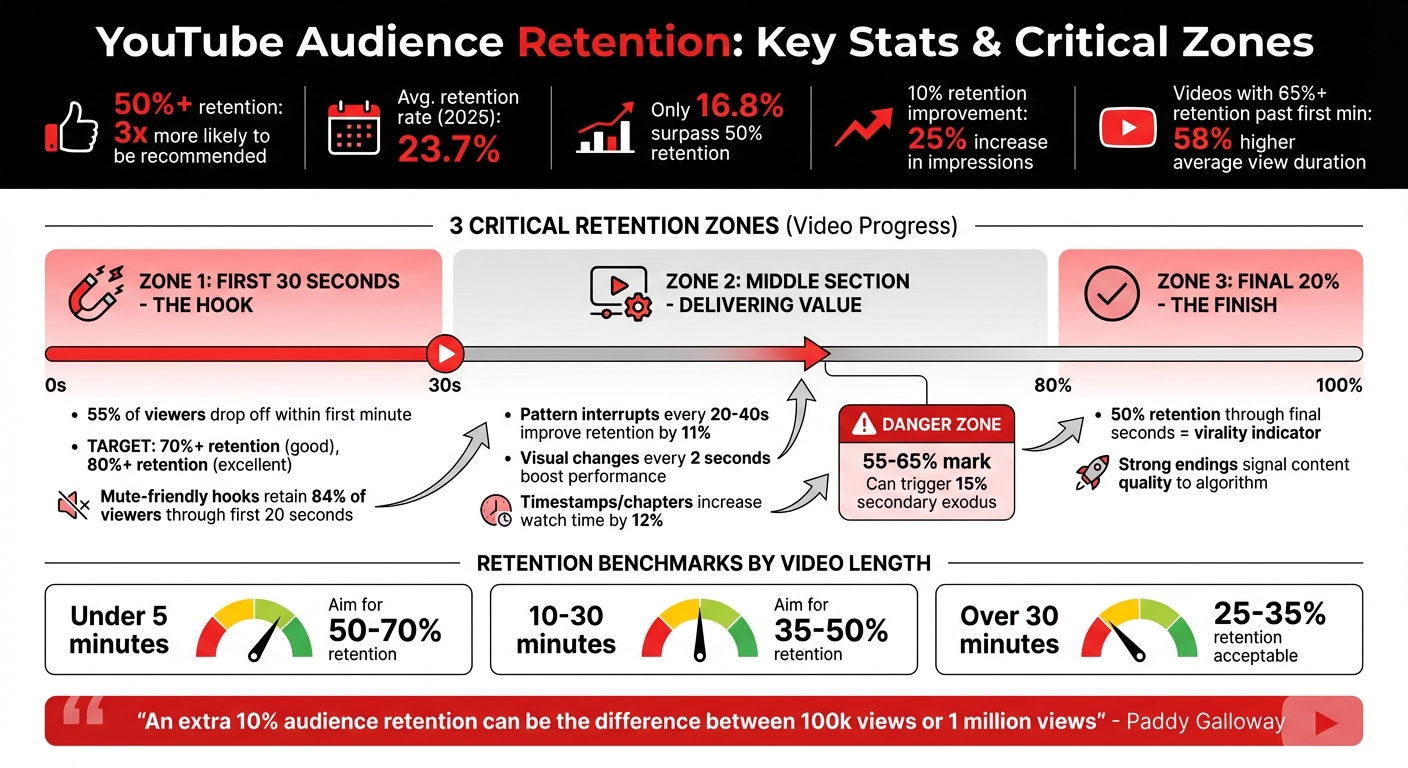
YouTube Audience Retention Statistics and Critical Zones for Video Success
YouTube Analytics For Beginners | Audience Retention | Stop Losing Viewers!
sbb-itb-08cadfc
What Is Audience Retention and Why It Matters
Audience retention measures how much of your video viewers actually watch before they leave. It’s calculated by dividing the average view duration by the total video length. For example, if someone watches 4 minutes of a 10-minute video, your retention rate is 40%.
YouTube tracks this metric using two key indicators: Average View Duration (AVD), which measures overall watch time, and Average Percentage Viewed (APV), which shows the portion of the video that was watched. While both are useful, APV often gives a clearer sense of whether your content is meeting expectations.
Retention plays a huge role in YouTube’s algorithm. The platform compares your video’s retention rate to others of similar length. If your video outperforms the average in your niche, it signals to YouTube that your content resonates with viewers. This makes retention a cornerstone metric for creators aiming to grow their reach.
How YouTube's Algorithm Uses Audience Retention
YouTube’s algorithm is designed with one main goal: keeping viewers on the platform for as long as possible. High retention rates tell the algorithm that your video is valuable, leading to more visibility. In fact, videos with a 50% or higher average view duration are three times more likely to appear in suggested videos, search results, and on the homepage.
On the flip side, if viewers leave early, it signals to YouTube that your content might not match its title or thumbnail - or that it’s simply not engaging. As a result, the algorithm limits its promotion to just your existing audience. However, videos that hold attention send a message of satisfaction, which encourages YouTube to distribute them more widely.
As Derral Eves explains:
"Watch time is the currency of YouTube. The longer you keep people watching, the more YouTube will push your content."
This principle explains why shorter videos with high retention often outperform longer ones. For instance, a 6-minute video with 80% retention (4.8 minutes watched) can do better than a 20-minute video with 30% retention (6 minutes watched). The shorter video demonstrates higher viewer satisfaction, which the algorithm rewards with more impressions.
Why Retention Reflects Content Quality
Retention is one of YouTube’s most reliable indicators of content quality. It provides a second-by-second breakdown of when viewers lose interest or decide to stick around. Unlike likes or comments - actions that don’t necessarily require watching the full video - retention highlights exactly where your content succeeds or falls short.
The data backs this up: videos that maintain 70% or higher retention in the first 30 seconds are far more likely to rank well in search results. Additionally, channels in the top 25% for audience retention see 3.5 times faster subscriber growth compared to others.
Ali Abdaal captures this idea perfectly:
"YouTube doesn't reward views - it rewards watch time. A video with fewer views but higher watch time will rank higher than a viral clip with a low retention rate."
Key Metrics to Measure Audience Retention
YouTube evaluates audience retention through two primary metrics: Absolute Retention and Relative Retention. Together, they offer a detailed view of how your video performs. Absolute Retention tracks the percentage of viewers watching every second, while Relative Retention compares your video's performance to other videos of similar length. Let’s break these down further to see how they can shape your video strategy.
Absolute Retention: Tracking Viewer Behavior
Absolute Retention provides second-by-second insights into viewer engagement. It highlights spikes (rewatches), flat lines (consistent viewing), and dips (drops of 4% or more). These patterns help pinpoint moments where viewers lose interest or stay engaged.
The first 30 seconds are crucial. Over 55% of viewers drop off within the first minute, making this phase a make-or-break moment. If your hook doesn’t align with the promise of your thumbnail or title, expect a steep early drop. For example, in March 2026, CareerFoundry restructured its video openings to focus on key insights, boosting retention during this critical window by 15–20 percentage points.
"The cool thing about YouTube is they give us super detailed graphs for every video that show the exact second we lose a viewer." – MrBeast
Spikes in the retention graph, where the percentage exceeds 100%, indicate rewatches. These moments highlight particularly engaging content. For instance, the Humble&Brag channel found that structured videos like "5 Lesser Known YouTube Growth Tactics" achieved 42.6% absolute retention - far outperforming their talking-head videos, which only managed 20–25%.
By examining these patterns, you can identify what resonates with your audience and refine your approach for future videos.
Relative Retention: Comparing Against Similar Videos
Relative Retention measures how your video stacks up against others of similar length on YouTube. A relative retention score of 0.5 means your video is at the median for its length, but if it’s 150% of the average, YouTube’s algorithm sees it as high-quality content worth promoting.
This metric plays a significant role in YouTube’s recommendation system. Even if a video has a modest 30% absolute retention rate, it can still perform well if that figure exceeds the average for its length. For example, in 2025, the average retention rate across YouTube was 23.7%, and only 16.8% of videos managed to surpass 50%. Improving channel-wide retention by just 10 percentage points has been linked to a 25% increase in impressions from YouTube’s recommendation algorithm.
Retention goals vary by video length. Videos under 5 minutes should aim for 50–70% retention, while longer content (over 30 minutes) can still succeed with rates between 25% and 35%. These benchmarks, combined with insights from Absolute Retention, provide a roadmap for improving engagement and optimizing your video strategy.
Both Absolute and Relative Retention metrics are essential for understanding viewer behavior and maximizing your video’s impact. By leveraging these insights, you can make data-driven adjustments to keep your audience engaged and improve your channel’s overall performance.
Where Viewers Drop Off: 3 Critical Retention Zones
Knowing where viewers stop watching your video can help you identify specific issues and improve engagement. These zones are tied to Absolute and Relative Retention metrics and offer insights into audience behavior. The first 30 seconds test whether your hook delivers on the promise of your title and thumbnail. The middle section evaluates whether you're keeping viewers interested with consistent value. Finally, the last 20% reveals if your content feels satisfying enough for viewers to stick around until the end - a key factor for YouTube's algorithm. Let’s break these zones down to uncover actionable ways to boost your video's performance.
The First 30 Seconds: The Hook
The first 30 seconds are make-or-break. Over half of viewers leave within the first minute, so your opening moments are crucial. A retention rate above 70% in this window is solid, while 80%+ retention signals content that YouTube is more likely to promote.
To keep viewers engaged, avoid common pitfalls like drawn-out intros, irrelevant logo animations, or failing to meet the expectations set by your thumbnail and title. Slow pacing or robotic delivery can also cause viewers to click away.
"Audience retention, especially early, is one of the strongest signals of quality." – YouTube Creator Insider
Use the 30-Second Blueprint to structure your opening effectively:
- 0–5 seconds: Grab attention with a shock, teaser, or intriguing question.
- 5–15 seconds: Reassure viewers by clarifying your video's promise.
- 15–30 seconds: Set the stakes or provide context to keep them hooked.
For an extra edge, apply the "Mute Test": ensure your first 5–10 seconds are visually engaging enough to spark curiosity, even without sound. Mute-friendly hooks can retain up to 84% of viewers through the first 20 seconds. Additionally, speaking slightly faster than usual and bringing high energy to your intro can signal enthusiasm and effort.
Middle Section: Delivering on the Promise
The middle portion - roughly 30 seconds to 80% of your video - should show a gradual retention decline. Sudden drops, often called "staircases", suggest moments where viewers lost interest or got confused. This section tests your ability to maintain momentum and deliver value.
To combat attention loss, use pattern interrupts - these are changes in visuals, audio, or pacing that reset the viewer's focus. Switching camera angles, adding graphics, or introducing new beats every 20 to 40 seconds can improve retention by 11%. Videos with frequent visual changes (every 2 seconds or so) tend to perform better overall. Including timestamp overlays or chapters can further boost total watch time by 12%.
Build trust by delivering value early while teasing more insights to come. For example, phrases like "Later in this video, I'll reveal..." create a sense of anticipation that keeps viewers engaged. Save your most compelling or advanced points for the latter half of this section to sustain interest.
If your retention graph shows dips of 4% or more, use YouTube Studio to identify weak spots. Common issues include lengthy explanations without visual support, abrupt topic changes, or redundant content. For longer videos (10+ minutes), the 55–65% mark is often a "Danger Zone", where failing to re-engage viewers can lead to a 15% secondary exodus.
Final 20%: Signaling Content Satisfaction
The last 20% of your video plays a crucial role in signaling quality to YouTube. When viewers watch until the end, it tells the algorithm your content is worth recommending. Retaining 50% of viewers through the final seconds is a strong indicator of potential virality in 2026.
A strong conclusion is key. Avoid "exit language" like "In conclusion" or "That's all for today", which can prompt viewers to leave early. Sharp drop-offs, or "The Cliff" pattern, often result from overly long outros or failing to provide a reason to stay.
End your video immediately after your final point to avoid unnecessary drop-offs. Hold back a bonus insight or critical takeaway until the very end to keep viewers anchored. Some creators even use a looping hack, designing their video to flow seamlessly from the end back to the beginning, encouraging rewatches and boosting retention beyond 100%.
Boosting retention in this zone can have a big impact. For instance, improving your channel's average retention by just 10 percentage points can drive a 25%+ increase in impressions from YouTube's recommendation system. Videos that retain more than 65% of viewers past the first minute also see a 58% higher average view duration. A strong finish not only satisfies viewers but also convinces the algorithm your content is worth sharing widely.
How to Improve Audience Retention
Now that you know where viewers tend to drop off, it’s time to dive into strategies that can keep them watching. The following techniques focus on three key areas of your video: the hook, the middle, and the finale. These tips are designed to help you pinpoint and address retention issues effectively.
Create a Strong Hook
The first few seconds of your video are make-or-break moments. As noted earlier, keeping viewers engaged during the opening 30 seconds is critical. In fact, mute-friendly hooks - where visuals alone grab attention - retain 84% of viewers through the first 20 seconds. A helpful test? Play the first five seconds of your video without sound. If the visuals don’t hold up, it’s time to rethink your opening.
Try the "Fast Worth, Slow Depth" technique for your intro. Start with an immediate payoff (like a surprising fact, a quick solution, or a visual teaser) in the first five seconds, and then layer in more context. This approach has been shown to improve channel performance by 1.7× compared to traditional intros. Avoid lengthy logo animations or disclaimers, as they can cause viewers to lose interest.
Use Dynamic Editing and Visual Elements
Keeping your video visually engaging is key to maintaining attention. Pattern interrupts - like changing camera angles, adding on-screen graphics, or inserting sound effects - can re-engage viewers and prevent boredom. Switching visuals every 30–45 seconds (or even as often as every two seconds) can boost retention by up to 11%.
B-roll footage is another powerful tool. Think of it as a garnish - use it every 20–40 seconds to break up long talking-head segments and visually illustrate your points. Sound design also matters. Effects like "whooshes" for motion or "pops" for text add polish. When it comes to background music, keep it balanced: aim for –20 to –25 dB for calm narration and –8 to –12 dB for high-energy moments.
Creators like Sergi López and Violet Byrne have shown how creative editing choices can make a big impact. López replaced constant EDM background music with brief pauses after exercise demos, boosting his retention by 18%. Byrne added quirky "ASCII-cat" breaks to her coding videos, increasing retention from 25% to 63%.
"Editing isn't the hero, your story is. The purpose of editing is to support your message, not to distract from it." – AIR Media-Tech
Tailor your editing style to your audience. For younger viewers (ages 13–24), aim for a visual change every 15–25 seconds. For older audiences (25+), opt for longer shots of 20–40 seconds to avoid overstimulation. Adding text, emojis, or graphic cues to emphasize key points can also reduce the need for repetitive narration.
Analyze and Adjust Based on Retention Graphs
Beyond creative tweaks, YouTube’s retention graphs are a goldmine for understanding your audience’s behavior. These graphs can reveal where viewers lose interest and guide your improvements. For example, a "Straight Decline" curve suggests a weak hook, while "Dips & Spikes" may point to confusing moments or parts viewers rewatch. Flatlines, on the other hand, indicate consistent engagement.
To address retention issues, create a Drop-Off Log for your three lowest-performing videos. Note timestamps with significant dips and describe what might have caused them (e.g., static visuals or repetitive content). Also, build a Spike Library to catalog moments where engagement spikes. These are the creative elements worth replicating.
Take inspiration from creators like Maya Delgado. Between February and April 2024, she tested changes like swapping hooks, adding chapters, and incorporating pattern interrupts across three uploads. Within 16 days, her average view duration jumped from 48% to 71%, leading to a boost in algorithmic recommendations. Her approach? Focus on fixing one issue per video rather than overhauling everything at once.
"The cool thing about YouTube is they give us super detailed graphs for every video that show the exact second we lose a viewer." – MrBeast
Lastly, compare retention rates between new and returning viewers. If new viewers drop off faster, it might mean your intro isn’t engaging enough for those unfamiliar with your channel. Even a 10-point improvement in retention can lead to over 25% more impressions from YouTube’s recommendation system.
Using Outlier to Refine Your Approach
Outlier provides a data-focused method to enhance your retention strategy and fine-tune your content planning.
While understanding retention graphs is important, identifying the right topics and hooks can make all the difference. Outlier (https://outlier.so) simplifies this process by delivering tailored video ideas based on competitor performance data - all in just two minutes.
How Outlier Analyzes Competitor Content
Outlier excels at spotting standout videos that perform 3 to 10 times better than a channel’s average. By analyzing over 10 million videos across more than 100,000 channels, it identifies the topics, hooks, and formats that are driving growth in your niche. The platform even organizes these into content pillars (recurring topic categories) and calculates which ones generate the most engagement.
It also visualizes a channel's performance trends over time, helping you pinpoint growth inflection points. This allows you to see how specific changes - like tweaking title formulas, adjusting hook structures, or focusing on new topics - have led to noticeable spikes in viewership.
Getting Personalized Video Ideas with Outlier
To get started, simply enter a competitor's channel URL. Outlier will analyze the last 90 days of content and generate custom video ideas for your channel. Each suggestion comes with a title, hook, confidence score, and key metrics like view velocity and proven patterns. The best part? You don’t need a subscription or even a YouTube account to access these insights - just enter the URL and go.
Outlier also includes a Script Analyzer that evaluates your video scripts for elements like hook strength, curiosity loops, and pacing before you start recording. This feature is particularly valuable since scripted videos typically retain 40–60% of their audience, compared to just 25–35% for unscripted content. Plus, the AI tool generates multiple hook variations inspired by top-performing videos in your niche, giving you the chance to test and find the one that resonates most with your audience.
"OutlierKit is the first tool that actually improved our view counts almost instantly. The competition analysis revealed gaps we never knew existed" – Gautham, YouTube strategist.
Conclusion
Audience retention is the key factor that determines whether your video reaches 100,000 views or skyrockets to 1 million. As Paddy Galloway explains:
"An extra 10% audience retention can be the difference between a video getting 100k views or 1 million".
With the average retention rates being relatively low, pinpointing where and why viewers drop off is essential if you want to stand out in a crowded space.
The three critical retention zones - the first 30 seconds, the middle section, and the final 20% - shape how well your audience stays engaged. For instance, videos that hold more than 65% of viewers past the first minute experience a 58% higher average view duration. Additionally, videos with retention rates of 50% or higher are three times more likely to be recommended by YouTube’s algorithm. By focusing on these zones and using techniques like compelling hooks, pattern interrupts, and satisfying conclusions, you can turn retention data into a powerful growth strategy.
Retention graphs are invaluable tools, offering second-by-second insights into viewer behavior. They highlight exactly where your content loses momentum. Even a 10% improvement in retention across your channel can lead to a 25%+ increase in impressions from YouTube’s recommendation system. By analyzing dips of 4% or more, identifying rewatch spikes, and reviewing your last 10 videos for recurring patterns, you can make targeted adjustments that directly impact your channel’s visibility and growth.
For creators seeking an edge, data-driven tools like Outlier (https://outlier.so) simplify this process. Outlier helps you identify successful topics, hooks, and formats within your niche by analyzing competitor content. It even provides personalized video ideas with confidence scores and proven patterns, giving you a clearer path to creating content that keeps viewers engaged. When paired with script analysis and hook optimization, these insights transform retention data into actionable improvements.
Top creators don’t just rely on creativity - they use retention data to inform their strategies. By mastering these metrics, focusing on key engagement zones, and leveraging data-driven insights, you can turn each video into a stepping stone for algorithmic success.
FAQs
What retention rate should I aim for based on my video length?
Retention rates can vary depending on video length. Here's a quick breakdown of what to aim for:
- Videos under 1 minute: Strive for a 70%+ retention rate (with 85%+ being outstanding).
- 1–3 minute videos: A good goal is 60%+, while 75%+ is considered excellent.
- 3–5 minute videos: Target a retention rate of 50%+; anything above 65% is exceptional.
- 5–10 minute videos: Aim for retention at 45%+, with 60%+ being a strong result.
- 10–20 minute videos: Shoot for a 40%+ retention rate, and 55%+ is a great benchmark.
These numbers can help guide your content strategy and ensure your audience stays engaged.
How do I tell if a retention drop is normal or a real problem?
To figure out if a drop in retention is normal or a red flag, start by comparing your data to benchmarks and analyzing your retention graph. A slow, steady decline is usually expected, but sharp dips - especially within the first 30 seconds - might point to issues with your hook or overall engagement. Retention rates typically fall between 40-60%, so if yours is much lower, it could be a sign that your content needs some tweaking.
What should I change first to boost retention on my next upload?
To keep viewers hooked, the first 30 seconds of your video are crucial. This brief window can make or break your retention rate. A compelling start - whether it sparks curiosity or delivers instant value - helps reduce early drop-offs and boosts your video's performance in YouTube's algorithm. Videos with intros that retain more than 65% of viewers tend to achieve longer average view durations, giving your content a better chance to thrive.


