

5 Steps To Validate Seasonal Video Topics
Seasonal video topics can drive huge traffic - if done right. But with 800+ hours of video uploaded to YouTube every minute and 95% of videos failing to reach 1,000 views, timing and preparation are everything. Here’s how you can ensure your seasonal content stands out:
- Google Trends & YouTube Search: Use tools like Google Trends to identify when interest in a topic peaks and YouTube Autocomplete to find trending keywords.
- Analyze Competitors: Study competitors’ performance using tools like Outlier to spot high-performing seasonal videos.
- Review Your Metrics: Look at your past videos’ view velocity and engagement to identify patterns.
- Community Insights: Explore Reddit, Facebook groups, and forums for real-time audience pain points and trending discussions.
- Track Performance: Use tools like Outlier and YouTube Analytics to validate ideas and monitor results.
Key takeaway: Publish 2–3 months before a trend peaks, and use data to guide every step. This approach minimizes guesswork and boosts your chances of success.
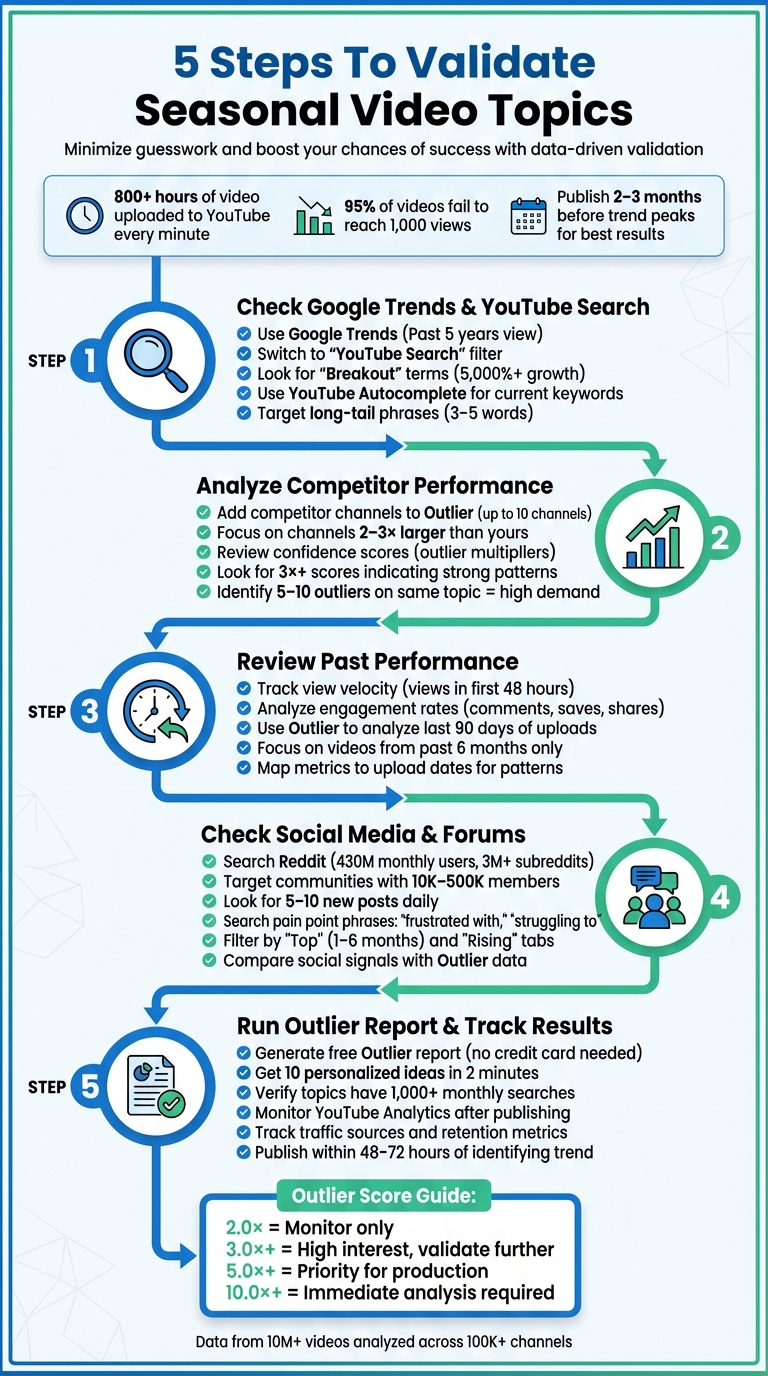
5-Step Process to Validate Seasonal Video Topics for YouTube Success
Understanding SEASONALITY on Your Channel!
sbb-itb-08cadfc
Step 1: Check Google Trends and YouTube Search Data
Before diving into creating a seasonal video, it’s smart to make sure there’s real interest in your topic. Tools like Google Trends and YouTube Autocomplete can help you do just that - and they’re completely free. These tools reveal when interest in your topic peaks and the exact terms people are searching for. Here’s how to use them to identify seasonal trends.
Review Historical Search Patterns in Google Trends
Start by opening Google Trends and setting the time range to "Past 5 years" to uncover patterns that repeat annually. To focus on video-specific data, switch the filter to "YouTube Search". Keep in mind, the graph uses a 0–100 scale where 100 represents peak interest - not the total number of searches.
Look for "Breakout" terms, which indicate search interest has grown by over 5,000%. For instance, searches for "Valentine's Day gift guide" consistently spike in December, months before the holiday itself. This insight tells you exactly when to publish your content. You can even export the data as a CSV file to calculate the average peak month.
"Publish content 2–3 months before the expected spike. This gives search engines time to index and rank your content." - Backlinko
Google Trends also lets you compare up to five keywords side-by-side to see which ones show the strongest seasonal growth. As of January 2026, the tool includes Gemini AI, which suggests related search terms and provides color-coded trend comparisons.
Find Current Keywords with YouTube Autocomplete
Once you’ve reviewed historical trends, use YouTube Autocomplete to uncover what people are searching for right now. Type your seasonal topic into YouTube’s search bar, and note the autocomplete suggestions. Start with seed keywords like "summer recipes" or "holiday decorations" to generate ideas. These suggestions are ranked by search volume, so they highlight what’s currently popular.
Pay attention to long-tail keyword phrases (3–5 words), as they often capture specific search intent. If the top-ranking videos for a particular keyword have fewer than 50,000 views, it’s a good sign that smaller channels can compete for that keyword. To validate the timing, cross-reference these autocomplete phrases in Google Trends by switching back to "YouTube Search". This approach ensures you know both what people are searching for and when they’re searching - helping you pinpoint the best time to upload your video for maximum visibility.
Step 2: Analyze Competitor Performance with Outlier
Once you've mapped out search trends, it's time to dig deeper and figure out which seasonal videos are actually making waves in your niche. But here’s the thing: don’t just look at view counts. Outlier’s performance multipliers can help you uncover real audience interest and algorithm-driven success stories.
Add Competitor Channels to Outlier
Start by entering the YouTube URLs of your competitors into Outlier's Channel Analyzer. This tool examines their last 90 days of uploads and calculates a median view count to establish a baseline. This baseline works as a benchmark for what "normal" performance looks like for that channel. You can analyze up to 10 competitor channels at once.
For the best results, focus on channels that are 2–3 times larger than yours. Why? Their strategies are more achievable compared to massive channels with enormous budgets and entire production teams [14, 16]. For example, if your videos average 5,000 views, analyzing a competitor with around 15,000 average views will provide practical and actionable insights.
Once you've gathered competitor data, use Outlier's confidence scores to spot breakout seasonal topics that are driving audience engagement.
Review Confidence Scores for Seasonal Topics
Outlier takes competitor data a step further with confidence scores, which measure how much better a video performs compared to the channel's baseline. Each video gets an outlier score - a multiplier like 3.0×, 5.0×, or even 9.1× - indicating how many times more views it earned than the channel’s typical video [16, 18]. For instance, a 5.0× score means the video pulled in five times the usual views, signaling real audience interest, not just a fleeting trend.
"Outlier videos are the secret weapon of successful YouTube creators. These are videos that perform significantly better than a channel's average - sometimes 5x, 10x, or even 20x better." - Aditi, Founder of OutlierKit
Focus on seasonal topics with scores of 3× or higher. While a 2× score might indicate a minor fluctuation, anything above 3× points to a strong content pattern worth exploring. If you notice 5–10 outliers on the same seasonal topic across multiple channels, that’s a clear signal of high audience demand. When you identify an outlier, take a closer look at the video’s title, thumbnail, and topic to understand what made it stand out.
Here’s a quick guide to interpreting outlier scores:
Outlier Score
Interpretation
Action Level
2.0×
Minor success or normal fluctuation
Monitor only
3.0×+
Strong outlier; proven content pattern
High interest; validate further
5.0×+
Potential viral hit; high audience demand
Priority for production
10.0×+
Massive breakthrough; algorithm outlier
Immediate analysis of hook/format
Step 3: Review Past Performance Metrics
After analyzing competitors, it’s time to turn the spotlight on your own track record. Digging into your historical performance can provide valuable clues. Don’t just focus on total view counts - pay attention to how quickly your videos gain momentum and how well they engage your audience.
Track View Velocity and Engagement Rates
View velocity is all about how fast a video racks up views right after it’s published. This metric is especially crucial for seasonal content, where timing can make or break success. For instance, a video that garners 50,000 views in 48 hours shows stronger demand than one that takes weeks to hit 100,000 views. Look for patterns in your niche. Did last year’s “back-to-school” videos peak immediately, or did they build up slowly over time?
Engagement metrics also paint a clear picture. High ratios of comments, saves, and shares compared to views suggest your content is resonating deeply with viewers. You can even map these metrics to upload dates to uncover actionable trends. For example, publishing 24–48 hours after a seasonal event might consistently yield better results. A great case in point: a gaming creator who shifted to tutorial-style videos saw a 60% increase in watch time.
Use Outlier's Performance Data
Manually sifting through data can eat up a lot of time. That’s where Outlier steps in. This tool automates the process, analyzing the last 90 days of competitor uploads to establish a median view baseline. This makes it easier to spot seasonal videos that have far exceeded expectations.
Focus your analysis on videos published within the past six months. Older viral hits might reflect outdated trends or algorithm changes. By identifying consistently strong seasonal themes, you can zero in on topics that deliver exceptional results. These historical insights can shape a strategy you can replicate for future success.
Use what you uncover here to fine-tune your approach as you move forward.
Step 4: Check Social Media and Community Forums
Algorithms can only tell part of the story. To truly understand if your seasonal topic hits home, you need to dive into real, unfiltered conversations. Pair these insights with the data from earlier steps to create a well-rounded validation strategy. Platforms like Reddit, Facebook groups, and niche forums are goldmines for these discussions - and they’re happening in real-time.
Search Niche Communities and Subreddits
Reddit alone boasts 430 million monthly active users and over 3 million subreddits. Focus on subreddits with 10,000–500,000 members, where you see 5–10 new posts daily and active comment sections. These metrics indicate a healthy, engaged community.
To uncover relevant pain points tied to your seasonal topic, search for phrases like "frustrated with", "struggling to", or "why is there no". Filter posts by "Top" for the past 1–6 months to spot ongoing trends. Don’t overlook the "Rising" tab - it’s a great way to catch emerging seasonal trends before they peak.
"Unlike surveys where people tell you what they think you want to hear, Reddit captures unfiltered conversations." - PainOnSocial
Pay close attention to the comment sections. These often reveal deeper insights, follow-up questions, and perspectives that the original post doesn’t cover. For example, if a subreddit with 50,000+ members frequently includes questions like, "Does anyone have a good YouTube channel for this?" - you’ve likely found a content gap. If the same topic pops up across multiple subreddits, Facebook groups, or even TikTok, it’s a strong indicator of lasting relevance.
These community-driven insights are essential when comparing them to YouTube performance metrics.
Compare Social Signals with Outlier Data
Social media buzz can validate which topics truly resonate, beyond what competitor metrics might show. For instance, if Reddit threads about "spring cleaning hacks" consistently draw high engagement, check if related videos in Outlier show strong view velocity and confidence scores.
Document your findings - such as pain points, quotes, URLs, upvotes, and comment counts - in a spreadsheet. This structured approach helps you identify recurring themes and gauge their intensity. A single post with 50 upvotes is worth noting, but repeated mentions with hundreds of upvotes signal a much stronger trend.
"The platform's upvote system acts as a built-in validation mechanism. When hundreds or thousands of people upvote a complaint or question, you're seeing proof that this pain point resonates widely." - PainOnSocial
Be cautious of confirmation bias. If a seasonal topic doesn’t generate organic discussion, it might not be worth pursuing. The most promising topics align both social conversations and Outlier’s performance metrics, pointing you in the same direction.
Use these combined insights to finalize your report and monitor how your seasonal content performs.
Step 5: Run an Outlier Report and Track Results
Now that you've gone through the earlier steps, it's time to put everything together and see how your seasonal video performs. By analyzing search data, competitor trends, past performance, and community discussions, you’ve built a solid foundation. The next step? Consolidate this information into a clear report and track how your video performs.
Generate Your Free Outlier Report
Head over to Outlier's platform at outlier.so and sign up for their free plan - no credit card needed. Once you're in, just enter a competitor's channel URL, and within two minutes, you'll get 10 personalized video ideas ranked by confidence scores. Each idea includes a suggested title, a hook, and data showing how competitor videos performed 3× to 20× better than their average content.
Outlier has analyzed over 10 million videos from 100,000+ channels, identifying more than 1 million high-performing outlier videos. This means the suggestions you’ll receive are tailored, not generic. Let’s say you’re exploring "spring gardening tips." Outlier might highlight a video idea with a 5× outlier score, meaning it performed significantly better than similar videos in the same niche.
"Smart creators don't guess, they steal what's already working." – Outlier
Once you’ve got your top ideas, double-check them with a keyword research tool. Look for topics with at least 1,000 monthly searches to ensure there’s enough audience interest. With your report ready, shift gears to monitoring your video's actual performance.
Monitor Results with YouTube Analytics
After using Outlier to validate your content, dive into YouTube Analytics to track its performance. Go to YouTube Studio (studio.youtube.com) and access the Analytics section. Compare your video's views to your channel's median to see if it’s hitting outlier-level performance. Pay close attention to audience retention metrics - these reveal where viewers drop off, helping you fine-tune pacing for future videos.
Take a closer look at traffic sources. If most views come from "YouTube Search", it’s a sign your keyword strategy is on point. On the other hand, if they’re from "Suggested Videos", it means the algorithm is actively promoting your content. You can also check the "Subscriber vs. Non-subscriber" ratio to see if your seasonal video is pulling in new viewers beyond your usual audience. Since 70% of YouTube watch time happens on mobile devices, make sure your text overlays and graphics are easy to read on smaller screens.
Document what worked and what didn’t. This data will act as a benchmark for future seasonal campaigns, helping you continuously refine your strategy and improve your results over time.
Conclusion
Using a step-by-step approach to validate seasonal topics with data can save time and boost your success rate. By confirming audience demand before creating content, you avoid wasted effort and increase your chances of producing trending videos. Many creators struggle with low view counts simply because they skip this crucial validation step. This five-step method removes the guesswork by combining insights from multiple data sources into a streamlined process.
The real game-changer here is combining diverse data tools. Google Trends highlights when interest peaks, competitor analysis shows what formats resonate, and community forums explain why people care. Tools like Outlier simplify this process by generating personalized video ideas with confidence scores in just two minutes, saving the 10–15 minutes you'd typically spend manually crunching numbers.
Timing is critical. Top creators aim to publish within 48–72 hours of identifying a rising trend to capture views before the market becomes saturated with similar content. Spotting trends early gives you the edge to produce quality videos while others are still debating their strategy.
Keep in mind that validation isn't about achieving perfection - it’s about minimizing risk. Look for topics with clear demand (at least 1,000 monthly searches), reasonable competition, and strong audience interest. By addressing these factors before production, you can reduce uncertainty and improve your chances of success.
Start with one seasonal topic, apply the five steps, and monitor its performance using YouTube Analytics. The data you gather will help fine-tune your strategy and uncover more winning ideas. With these insights, you'll stay ahead of the competition and consistently deliver content that resonates.
FAQs
How do I pick the right month to publish a seasonal video?
Timing is everything when it comes to creating content that resonates. Choose your month wisely by focusing on key calendar events, holidays, or moments that matter to your audience. For example, Valentine’s Day sparks interest in February, back-to-school season dominates late summer, and Halloween takes over October.
By publishing videos in the weeks leading up to these events, you can ride the wave of increased search interest and engagement. This approach ensures your content not only aligns with audience behavior but also captures their attention when they’re actively seeking related topics.
What outlier score should I treat as a real winning topic?
An outlier score of 3x or higher signals a strong-performing topic. In simple terms, the video is performing 3 to 10 times better than your channel's average. This kind of result highlights content that truly connects with your audience and keeps them engaged.
Which YouTube Analytics metrics matter most for seasonal videos?
Understanding watch time, click-through rate (CTR), audience retention, and traffic sources is crucial when analyzing seasonal video performance on YouTube.
- Watch time helps pinpoint which videos resonate most during specific seasons.
- CTR reflects how well your thumbnails and titles grab attention.
- Audience retention reveals where viewers lose interest and stop watching.
- Traffic sources shed light on how viewers discover your content, offering insights to fine-tune your seasonal approach.
These metrics work together to guide your strategy and improve your content's impact during seasonal peaks.


