

YouTube Posting Timing: Data-Driven Tips for 2025
When’s the best time to post on YouTube? It depends on your audience, content type, and their viewing habits. Timing matters because YouTube evaluates your video’s performance in the first 2–4 hours after upload. Posting at the right time can boost engagement by up to 30% in just 24 hours.
Here’s what you need to know:
- Post 2–3 hours before peak activity. This gives YouTube time to process your video and notify viewers.
- Audience habits are key. Most users are active during evenings (6–9 PM) or weekends (9–11 AM on Sundays).
- Content type matters. Educational videos work best mid-week, while entertainment thrives on weekends.
- Time zones count. For international audiences, aim for overlapping active hours, like 12–3 PM EST.
Use tools like YouTube Studio’s heatmap to find when your viewers are online, test different times, and refine your schedule based on engagement metrics like click-through rate (CTR) and watch time. Consistency is just as important - stick to a regular posting schedule to grow your audience and algorithm visibility.
The Best Time to Post on YouTube - 1 Million Videos + Shorts Analyzed ⚡️
Key Factors That Affect YouTube Posting Times
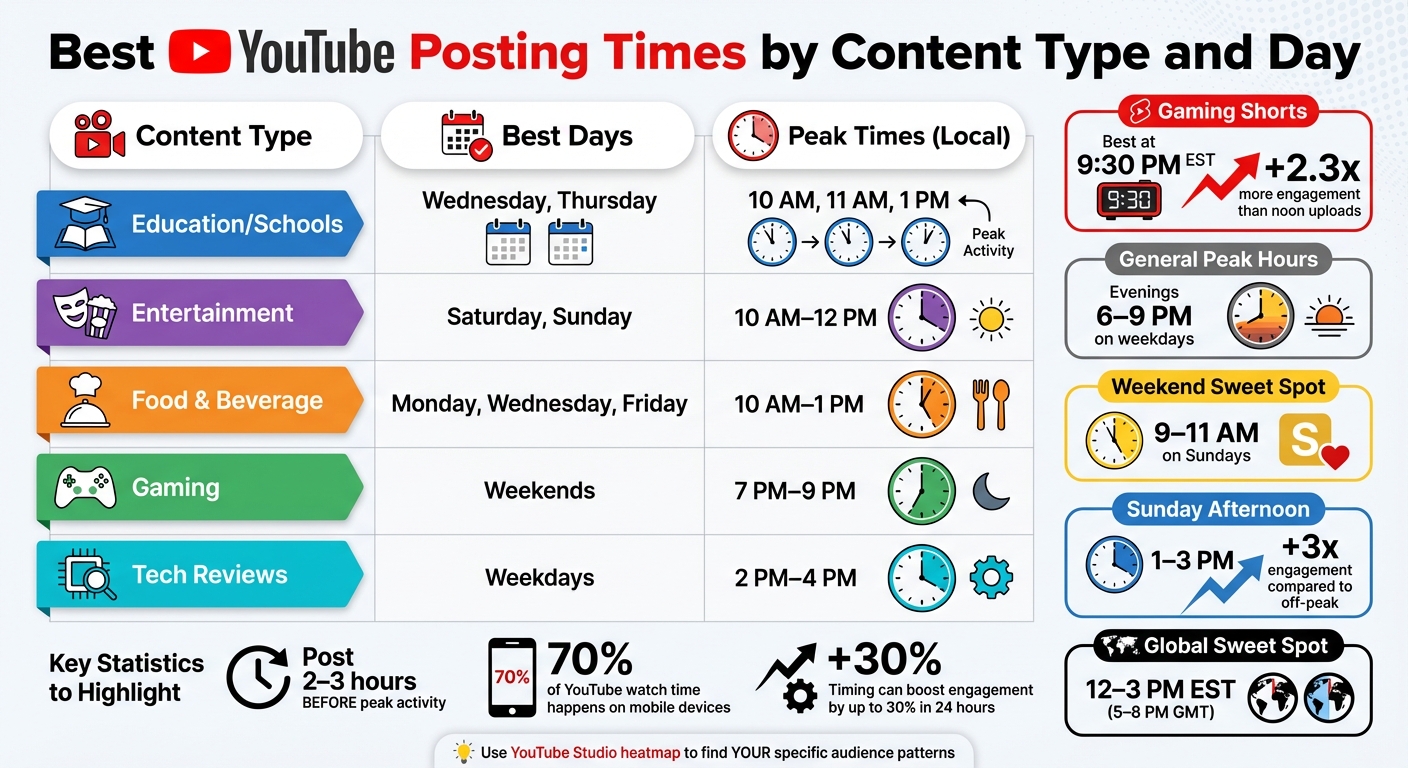
Best YouTube Posting Times by Content Type and Day
Finding the perfect time to post on YouTube isn’t a one-size-fits-all formula. It hinges on your audience's habits, the type of content you create, and where your viewers are located. Let’s break down the key factors that can help you pinpoint your ideal posting schedule.
Audience Activity and Viewing Patterns
Most YouTube viewers follow predictable routines shaped by their daily schedules. Work and school commitments drive peak activity during specific windows, like lunch breaks (12–1 PM), mid-afternoon lulls, and evening relaxation hours (6–9 PM). With over 70% of YouTube watch time happening on mobile devices, it’s smart to align your uploads with moments when people are likely to scroll - think morning commutes (7–9 AM) or late-night browsing.
Weekends, however, are a different story. Viewers tend to hop on YouTube earlier in the day, between 9–11 AM, and stay engaged longer. Sundays, in particular, see a significant spike in activity, with engagement tripling between 1–3 PM compared to quieter times.
By understanding these viewing habits, you can move beyond generic advice and tailor your posting schedule to better suit your audience’s behavior and your content type.
How Your Content Niche Affects Timing
The type of content you create plays a big role in when your audience is most likely to engage. For example:
- Educational content thrives during weekdays, especially mid-morning to early afternoon (10 AM–1 PM), when people take breaks from work or study.
- Entertainment and vlogs perform better on weekends or weekday evenings when viewers are unwinding.
- Gaming videos often see higher engagement during late-night hours or weekend afternoons. Gaming Shorts, for instance, tend to perform best when posted at 9:30 PM EST, generating 2.3 times more engagement than those uploaded at noon.
Here’s a quick breakdown of some common content types and their best posting times:
Content Type
Best Days
Peak Times (Local)
Education/Schools
Wednesday, Thursday
10 AM, 11 AM, 1 PM
Entertainment
Saturday, Sunday
10 AM–12 PM
Food & Beverage
Monday, Wednesday, Friday
10 AM–1 PM
Gaming
Weekends
7 PM–9 PM
Tech Reviews
Weekdays
2 PM–4 PM
The format of your videos also matters. Shorts, for example, are perfect for quick consumption during lunch breaks or before bed, while long-form videos perform better during dedicated viewing times in the late afternoon or evening. To make the most of these trends, consider staggering your Shorts and long-form uploads to capture attention at different times.
Once you’ve nailed down the best times based on your content type, it’s time to think about geography.
Managing Time Zones for International Viewers
If your audience spans multiple countries, time zones can complicate your posting strategy. But YouTube Studio’s Audience tab makes it easier by showing you your top three regions for viewership. The goal is to find overlapping windows when audiences in different time zones are active.
A global sweet spot often falls between 12 PM and 3 PM EST (5 PM to 8 PM GMT), which works well for North American afternoon viewers, European evening audiences, and even some Asian morning viewers. For instance, MrBeast often schedules his uploads around 3 PM EST to hit North America’s downtime and Europe’s prime viewing hours.
"The best time to post to YouTube isn't a single magic hour. It's a sophisticated strategy that balances universal peak times with your unique audience's behaviour." - Colossal Influence
How to Find Your Best Posting Times
Knowing the theory behind optimal posting times is one thing, but finding your perfect schedule requires digging into data and running some experiments. Here's how to move from guesswork to a data-driven approach.
Using YouTube Analytics to Track Viewer Activity
YouTube Studio offers a built-in tool to help you understand when your audience is online. Head to YouTube Studio > Analytics > Audience and check out the "When your viewers are on YouTube" report. This heatmap highlights activity over the past 28 days, with darker purple bars marking peak times. For instance, if the heatmap shows your audience is most active between 7:00 PM and 9:00 PM, aim to upload your video 1–2 hours earlier. This gives YouTube the time it needs to process and index your video. As Jithin Chandra from Kalakaaar explains:
"You don't want to post at the peak time. You want to post 1 to 2 hours before your peak time. Why? This gives YouTube enough time to index your video."
If your channel is new and you don’t have enough data for the heatmap, try the Realtime graph under Analytics > Overview. This tool tracks activity over the last 48 hours, showing hourly spikes. By logging these trends over a month, you can start to identify patterns. Additionally, check the Top Geographies report in the Audience tab. If a significant portion of your viewers is in a different time zone, adjust your posting schedule to align with their local peak hours. Once you gather these insights, it’s time to test different posting times.
Testing Different Posting Times
After analyzing your data, it’s time to test your findings. Experiment with three to four posting times over four to six weeks, and closely monitor performance. The first two hours after uploading are critical - this is when YouTube’s algorithm evaluates early engagement metrics like click-through rate (CTR) and average view duration (AVD). A strong CTR typically falls between 6% and 10%. Comparing AVD across time slots can also reveal when your audience is most engaged.
Fine-tuning your posting schedule can lead to impressive results. Optimized timing can increase views by 35% to 45% compared to random uploads. Even better, posting in sync with your audience’s habits can potentially double or triple engagement. Beyond analytics, use the YouTube Community tab to poll your subscribers and ask when they prefer to watch new content. This feedback can validate your data-driven decisions.
Using Tools for Content and Competitor Analysis
Combining your analytics with broader market trends can refine your strategy even further. Start by subscribing to five to ten leading channels in your niche, enabling notifications to track their upload times. Keep a log of these "drop times" in a spreadsheet, identifying crowded periods and open slots where you might face less competition. For example, try posting 90 minutes before or after a major competitor’s usual time to capture part of their audience.
You can also use tools like Social Blade to analyze competitors’ historical upload patterns and spot changes in their strategies. Another option is Outlier, which reviews competitor content from the last 90 days and generates personalized video ideas. It provides insights like trending topics, suggested titles, hooks, and view velocity data. These tools make it easier to identify what’s currently working in your niche, helping you adjust both your content and timing for maximum impact.
sbb-itb-08cadfc
Creating a Consistent YouTube Posting Schedule
Once you’ve pinpointed the best times to post, the next step is to create a schedule that you can stick to. Consistency is what keeps your audience coming back and helps the algorithm favor your content. When viewers know exactly when to expect your next video, they’re more likely to check back regularly. The algorithm picks up on this behavior and rewards consistent uploaders by boosting their videos in suggested feeds and homepage recommendations.
Here’s why timing matters so much: Early engagement has 3.2 times more influence on the algorithm, and videos posted when over 60% of your subscribers are active get 2.1 times more impressions in the first six hours compared to off-peak uploads. This “snowball effect” means that the more engagement your video gets right after it’s published, the more likely it is to reach a broader audience.
In 2025, the focus has shifted to quality and engagement over sheer volume. As Iryna Avramenko from AIR Media-Tech explains:
"The algorithm in 2025 is all about quality, engagement, and retention, not just how many videos you upload".
Instead of churning out daily videos, creators are finding success with one or two high-quality uploads per week. This approach not only prevents burnout but also ensures better viewer retention. A steady rhythm of well-made content keeps your channel active in features like Browse and Suggested, even if you skip a week. By planning ahead and staying flexible, you can build a schedule that works for both you and your audience.
Planning Your Weekly or Monthly Upload Schedule
Start by using the heatmap in YouTube Studio to see when your audience is most active. Build your posting calendar around these peak times. For example, if Tuesdays and Thursdays show high activity, aim to post your main videos on those days without overloading your production capacity.
The best posting times can vary depending on your niche:
- Gaming channels often perform well on Fridays between 7:00 PM and 10:00 PM, catching weekend viewers.
- Educational content tends to do better on Tuesdays through Thursdays during lunch breaks (12:00 PM–1:00 PM) or early evenings (5:00 PM–7:00 PM).
- Fitness channels see strong engagement with early morning uploads (6:00 AM–8:00 AM) on Mondays, Wednesdays, and Fridays, aligning with workout routines.
For instance, TechReviewPro moved to a regular Tuesday 10:00 AM EST schedule and saw a 62% jump in average views over three months. Similarly, FitnessWithSarah switched to 6:00 AM uploads on Mondays, Wednesdays, and Fridays, leading to a 46% increase in average views within two months.
Batch production is a lifesaver for staying consistent. Record several videos in one session and use scheduling tools to spread them out over your calendar. This method ensures you stay on track even during busy periods, and you can keep your channel active with lighter content like YouTube Shorts or Community Tab polls that don’t require as much effort.
Scheduling Videos in Advance
YouTube Studio’s scheduling feature allows you to upload videos well ahead of time and set them to go live during your audience’s peak activity hours. Make sure to upload at least 1–2 hours before the peak to allow for processing. This gives you precise control over timing and ensures your video is ready to perform at its best.
The first two to four hours after a video goes live are crucial. During this window, YouTube evaluates metrics like click-through rate and average view duration to decide how widely to promote your content. Videos posted at peak times can see a 23% to 47% boost in view velocity within the first 24–48 hours. By scheduling strategically, you can maximize your video’s chances of catching the algorithm’s attention without needing to manually upload at inconvenient times.
Adjusting Your Schedule for Trends and Seasons
Even with a solid schedule in place, it’s important to stay flexible. Audience habits can shift over time, so check your YouTube Studio heatmap regularly - at least once per quarter - to spot changes. For example, summer might bring more daytime viewers, while winter could push activity to the evenings. Holidays can also affect viewing patterns, with travel-related content often performing better in the mornings as people plan their trips.
If you notice a drop in engagement, test new posting times over four to six weeks to find a better slot. Keep your audience informed about these changes through the Community Tab to maintain their trust and keep them engaged.
You can also ride the wave of trending topics by using tools like Outlier, which analyzes competitor content from the past 90 days. If a trend aligns with your niche, consider adding an extra video to your schedule. For example, the gaming channel GamersUnited shifted its main upload to Friday at 8:00 PM and added weekend follow-ups, boosting average views by 54% - from 120,000 to 185,000.
Above all, prioritize quality over rigid consistency. If a video needs extra time to meet your standards, take it. As Rob Glover from WordStream puts it:
"Consistency is key on YouTube, so ideally you should aim to post every week".
Keeping your audience in the loop through the Community Tab can help maintain their trust, even if your schedule changes. A thoughtful, data-driven approach will keep your channel thriving and set you up for long-term success on YouTube in 2025.
Conclusion: Using Data to Improve Your YouTube Posting Strategy
When it comes to deciding the best times to upload on YouTube, trust data - not guesswork. Tools like YouTube Studio's heatmap can show you exactly when your audience is most active. From there, experiment with different time slots over a few weeks. The results speak for themselves: syncing your uploads with peak viewer activity can increase engagement by up to threefold.
This data-driven approach becomes even more critical as YouTube's algorithm evolves. By 2025, YouTube's AI has become highly sophisticated, analyzing individual viewing habits to fine-tune recommendations. Todd Beaupré, Senior Director of Growth & Discovery at YouTube, explains:
"The recommendation system uses time of day and device as some of the signals… we try to identify if you tend to have a preference for watching news in the morning and comedy at night."
What does this mean for you? It means timing your uploads with precision, tailoring them to your audience's daily habits. Tools like Outlier can help by providing quick, personalized insights into trending topics, effective titles, hooks, and even view velocity. These insights can also help you identify quieter time slots when your content has less competition from major channels [9,12]. All of this reinforces the importance of using data at every step of your strategy.
Consistency is another key factor. A steady posting schedule not only helps build trust with your audience but also aligns with YouTube's algorithm, which thrives on predictability. Scheduling tools can help you stay on track and maintain that rhythm.
In 2025, successful creators combine high-quality content with smart timing. By letting data guide your decisions and staying flexible enough to adapt to trends, you'll maximize your chances of reaching and engaging your audience effectively.
FAQs
What’s the best way to find the ideal time to post on YouTube for my audience?
To determine the best time to post on YouTube for your audience, start by diving into YouTube Analytics. Head to the Audience tab and check the When your viewers are on YouTube report. This section highlights the days and hours when your subscribers are most active. Pay attention to the peak 2-hour time blocks and compare them to common trends: weekdays tend to peak around midday (12:00 PM–3:00 PM PT), while weekends often see higher activity in the early evening (3:00 PM–5:00 PM PT). If your audience’s behavior aligns with these patterns, schedule your uploads during those times. If not, stick to the specific hours your data points out.
To fine-tune your posting schedule, consider running a quick experiment. Post similar videos during two different high-traffic times over a two-week period. Then, compare early performance metrics like views, click-through rates, and watch time within the first 2–4 hours. If one time slot shows a 20–30% boost in engagement, you’ve likely found your sweet spot. For an extra edge, tools like Outlier can help you analyze competitor trends and offer tailored recommendations to refine both your posting schedule and overall content strategy.
How do time zones impact the best time to post on YouTube?
Time zones matter a lot when it comes to choosing the best time to post on YouTube. Why? Because the platform’s algorithm tends to favor videos that get quick engagement. If you upload a video when most of your audience is asleep or offline, you could miss out on those all-important early views, likes, and comments. And without that initial traction, your video’s chances of being pushed to a wider audience drop significantly.
But if you post during the hours when your audience is most active, you’re more likely to see a surge in engagement within the first 2–4 hours. That early activity can make a big difference in how your video performs overall.
To figure out the best timing, start by checking YouTube Analytics. It’ll show you where your viewers are located and the time zones they’re in - like EST, PST, or CST. Once you know that, aim to upload your videos during their local peak hours. For example, weekdays between 12 PM and 4 PM or weekends between 9 AM and 11 AM are generally good windows.
If your audience is spread across multiple time zones, you might need to get a little strategic. Try scheduling your uploads so they overlap with the most active regions. Tools like Outlier can make this easier by analyzing your audience’s activity patterns and even tracking trends among your competitors. This way, you can pinpoint the perfect posting time to maximize engagement.
How does the type of content affect the best time to post on YouTube?
The best time to post on YouTube varies depending on the type of content you're creating, as different formats resonate with audiences at different times. YouTube Shorts tend to thrive during quick activity spikes, with peak engagement happening midday and early evening on weekdays, and from mid-morning to late evening on Saturdays. Meanwhile, long-form videos perform better when viewers have more downtime, like weekday afternoons or evenings. As for live streams, they shine brightest on weekend evenings when people are more likely to join and interact in real time.
If you're aiming to boost early engagement - which the YouTube algorithm favors - consider these tips: schedule Shorts for midday or evening, upload long-form videos in the afternoon or early evening, and reserve live streams for the weekend. Posting at times that match your audience's habits can give your content a stronger start.


